


Changelog
New node: Validate files against templates
A new Validate Files node brings flexible, template-based validation directly into your Multi FileFeed workflows. You can validate one or multiple files against their respective templates at any point in your flow, making it easier to enforce data quality exactly where you need it.
Validation results are clearly surfaced, with failures showing error summaries and easy access to file previews for troubleshooting. This node also provides a modular alternative to built-in validation, giving you more control over how and when validation is applied within your workflows.


.png)
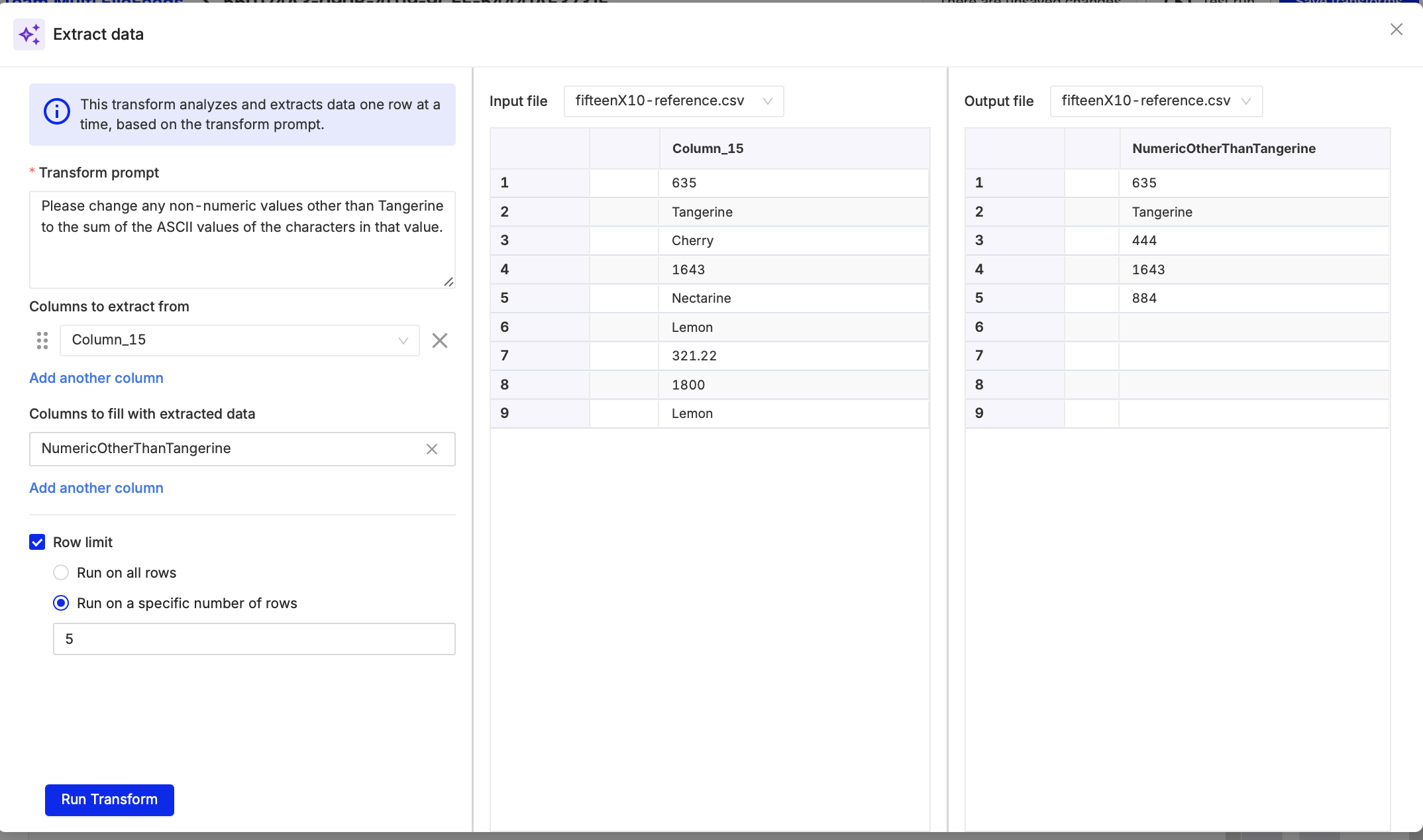
New node: Extract data with AI
A new Extract Data node lets you apply an AI prompt to values in a selected column and automatically generate a new column with the results. This makes it easy to enrich, classify, or transform data at scale without writing custom code.
You can configure the node by selecting your source data, defining a prompt, choosing the column to process, and naming the output column with the option to test on a subset of values before running across your full dataset.
MCP server for AI-powered integrations
We’ve launched a Model Context Protocol (MCP) server that gives AI coding assistants direct, up-to-date access to OneSchema’s API specs and product guides. By connecting your assistant to the MCP endpoint, it can discover endpoints, understand schemas, and generate accurate integration code without relying on outdated documentation.
The server provides read-only access to API specifications and guides over HTTP, making it easy to integrate with tools like Claude, Codex, and Devin.

Global file management for Multi FileFeeds
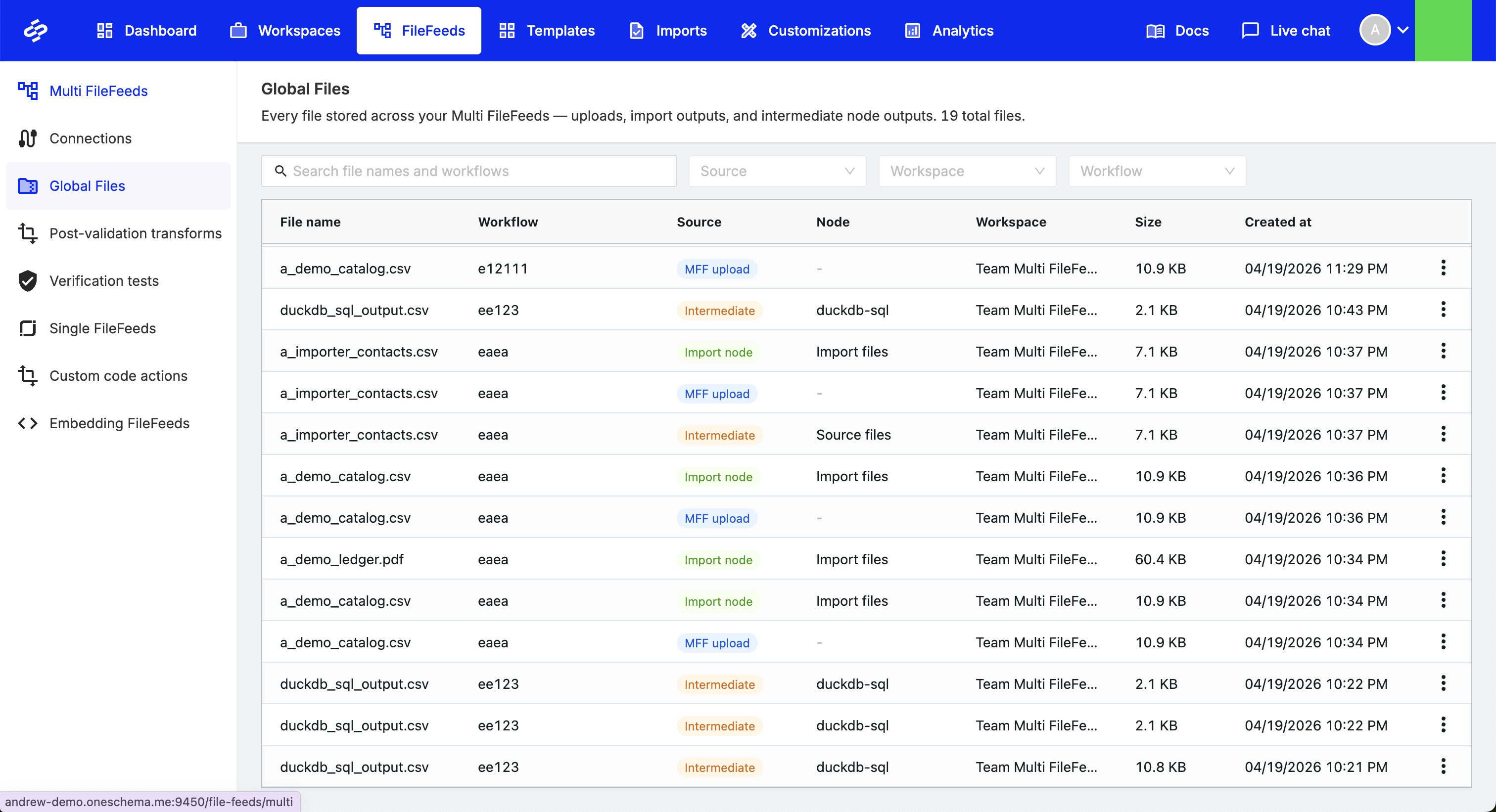
You can now access all files uploaded into Multi FileFeeds from a centralized Global Files view. This provides a single place to browse, download, and manage files across workflows, making it easier to track and operate on your file data at scale.
Auto-save for Custom File Transform code
Code in the Custom File Transform editor is now automatically saved when you close the editor. You can safely navigate away or check other parts of your workflow without losing your work, making iteration faster and more reliable.

Expandable file preview in Multi FileFeeds
File previews in the Multi FileFeed canvas can now be expanded to full browser height, making it easier to review and work with larger datasets. Simply use the expand option in the preview header to switch to a more spacious view.
.png)
Multi FileFeed builder UX improvements
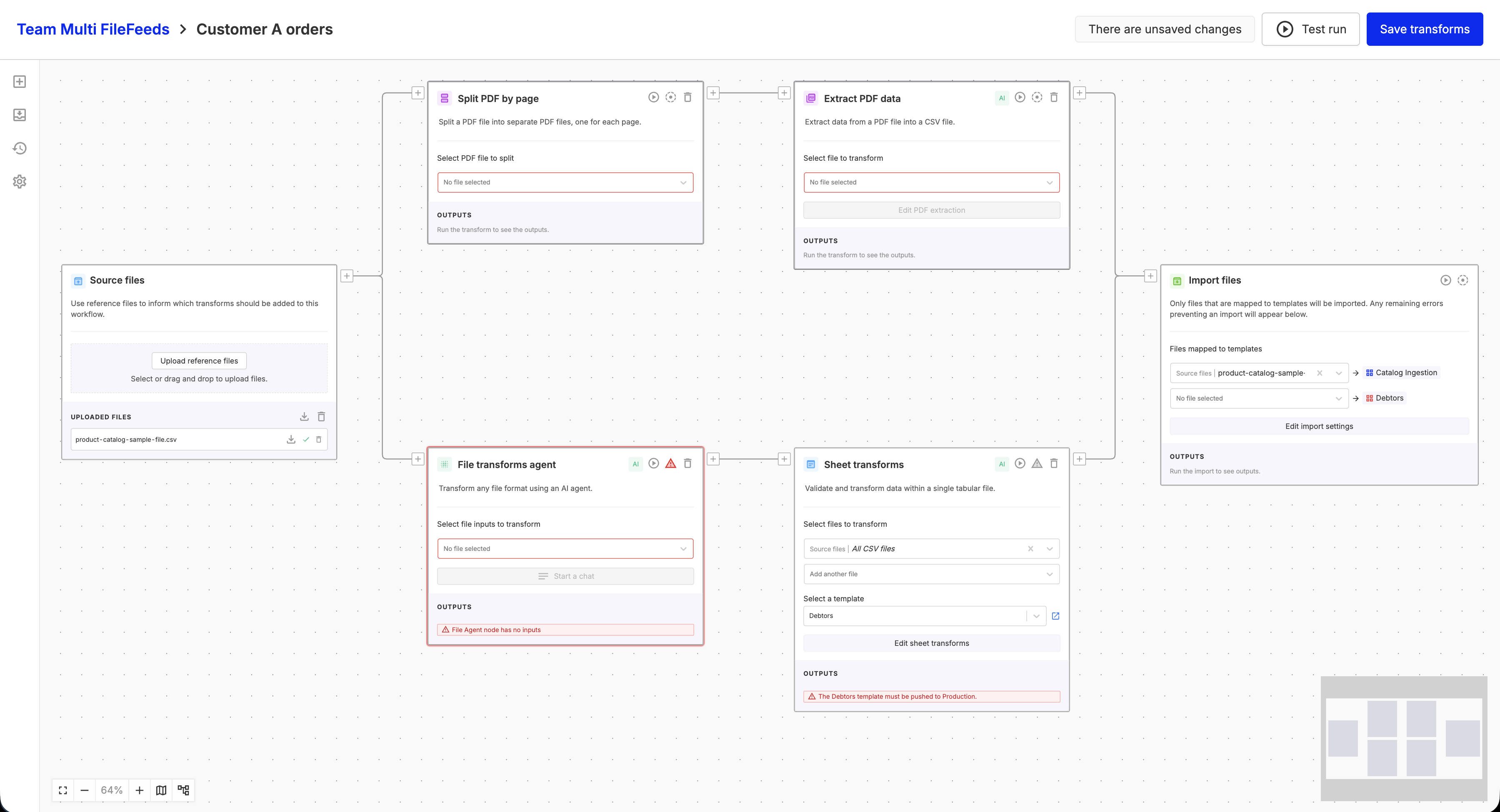
We’ve rolled out a series of enhancements to the Multi FileFeed builder to make workflows easier to build, navigate, and understand:
- Clearer workflow visuals: Edges now use structured right-angle routing for improved readability.
- Faster node editing: Add steps anywhere in your flow with a new inline insert option, while keeping existing connections intact.
- Keyboard shortcuts: Quickly access common actions like test runs, auto-layout, and zoom controls via a new shortcuts panel.
- Smoother interactions: Improved drag indicators, hover states, and stable viewport behavior create a more predictable editing experience.
- Enhanced file previews: Preview images and Office files directly in the builder with zoom and navigation controls.
Together, these updates make it easier to build, debug, and iterate on complex workflows.
API access to Multi FileFeed import errors
You can now programmatically retrieve validation errors from Multi FileFeed imports using a new API endpoint. This makes it easier to integrate error handling into your workflows, automate troubleshooting, and surface issues directly in your downstream systems.

Preview MS Office files in Multi FileFeeds
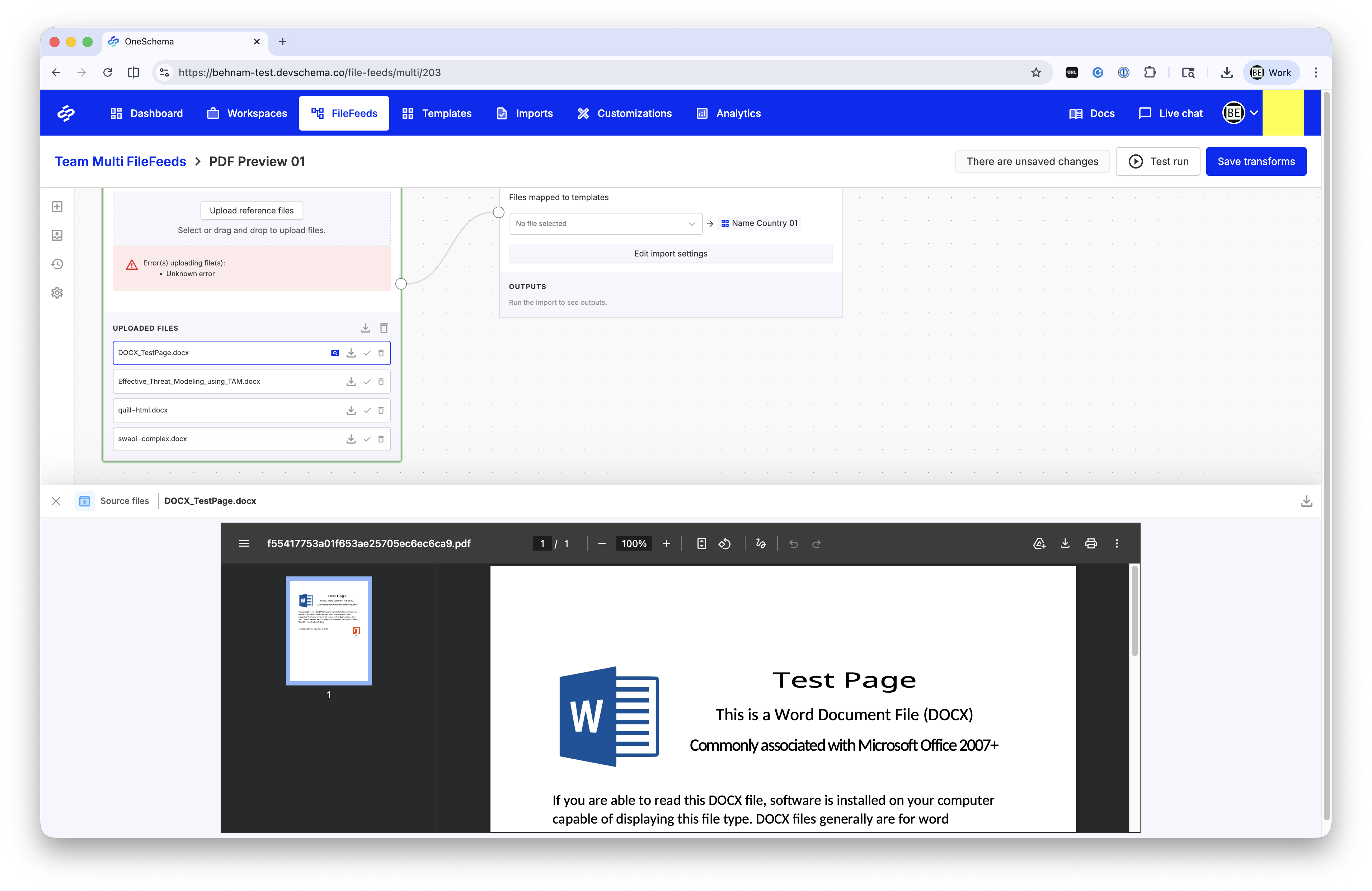
You can now preview Microsoft Office files (DOCX, PPTX, XLSX) directly in the Multi FileFeed builder. Files are rendered as PDFs for easy in-app viewing, similar to existing text and RTF previews, making it faster to inspect content without downloading.
Preview generation is optimized for large files, with limits applied to ensure a smooth experience. These changes do not affect the original file or download behavior.
More flexible SFTP scheduling with minute-level control
SFTP pull schedules for FileFeeds and Multi FileFeeds can now be configured in 5-minute increments, giving you more precise control over when data is ingested. This allows workflows to start closer to when files arrive, reducing delays and improving timeliness, while existing schedules continue to run as configured.

Environment selection for manual MFF imports
You can now choose which environment a manual Multi FileFeed import runs against directly from the import modal. Import records also display the associated environment in the imports table and canvas sidebar, providing clearer visibility and control across environments.

List view for Templates page
The All Templates page now includes a list view option, allowing you to switch between the existing card layout and a more compact table format. This makes it easier to scan, compare, and manage templates at scale.

Inline selection for “Call Multi FileFeed” nodes
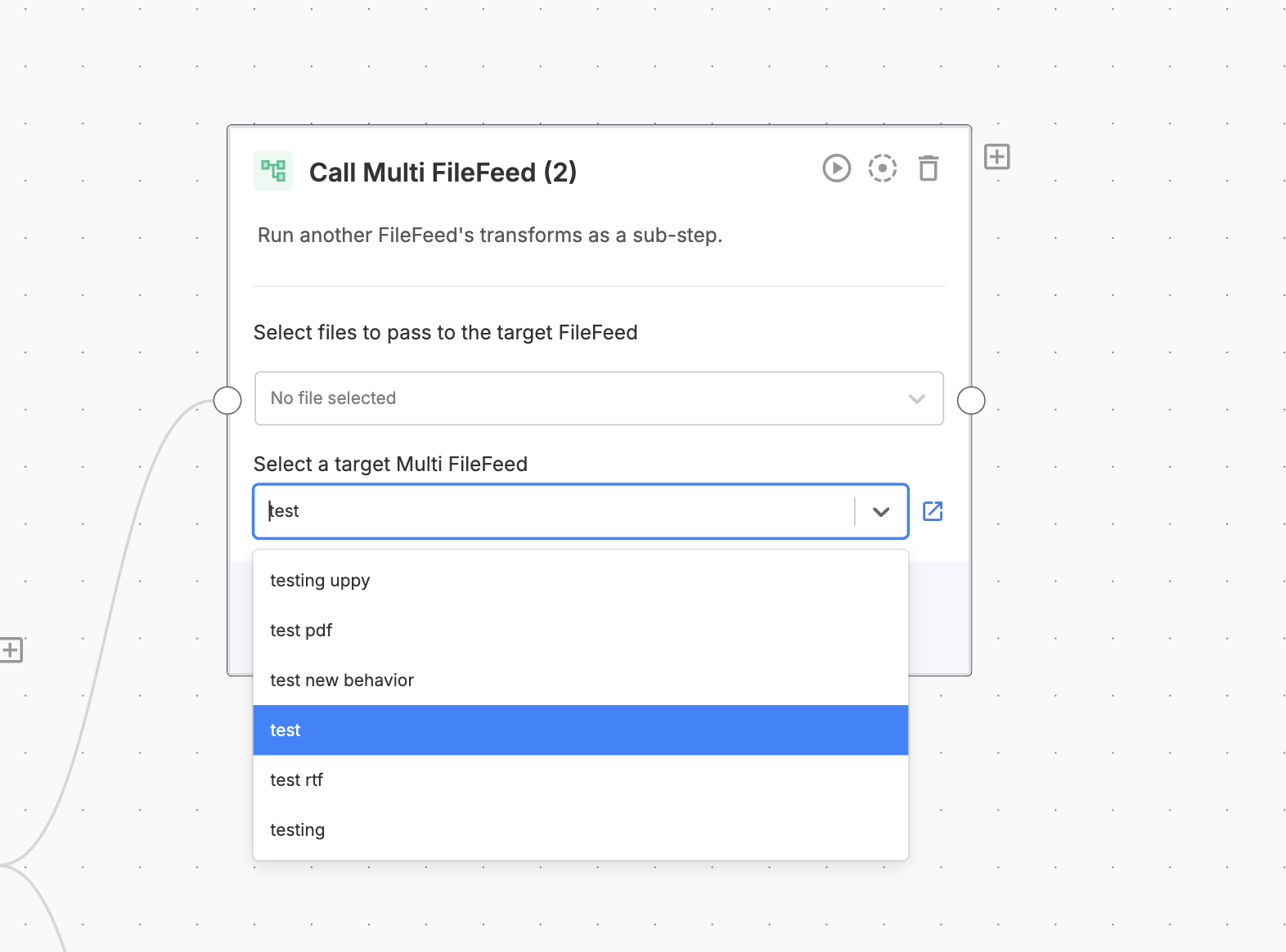
You can now select and update the target Multi FileFeed directly within the “Call Multi FileFeed” node (no separate modal required). This streamlines both creation and editing, and brings the experience in line with other nodes like Sheet Transforms.
Per-file upload progress for Multi FileFeed imports
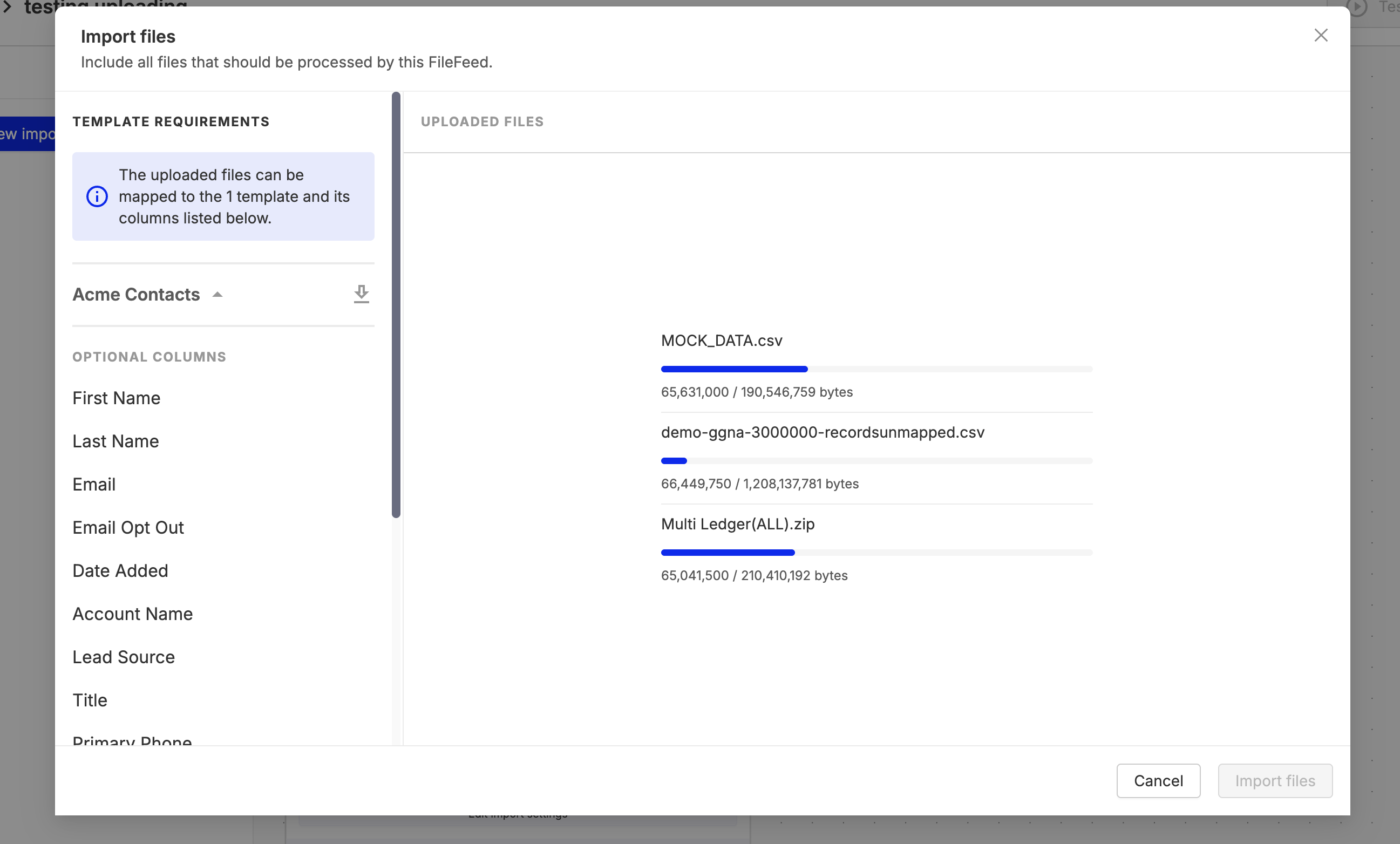
Uploads in Multi FileFeeds now show real-time, per-file progress with byte-level detail. Each file displays its own progress bar, giving you clear visibility into upload status. This is especially helpful for large or multi-file imports. This experience is available in both the Source Files node and the manual import flow, making uploads more transparent and reliable.
Multi FileFeeds usage dashboard
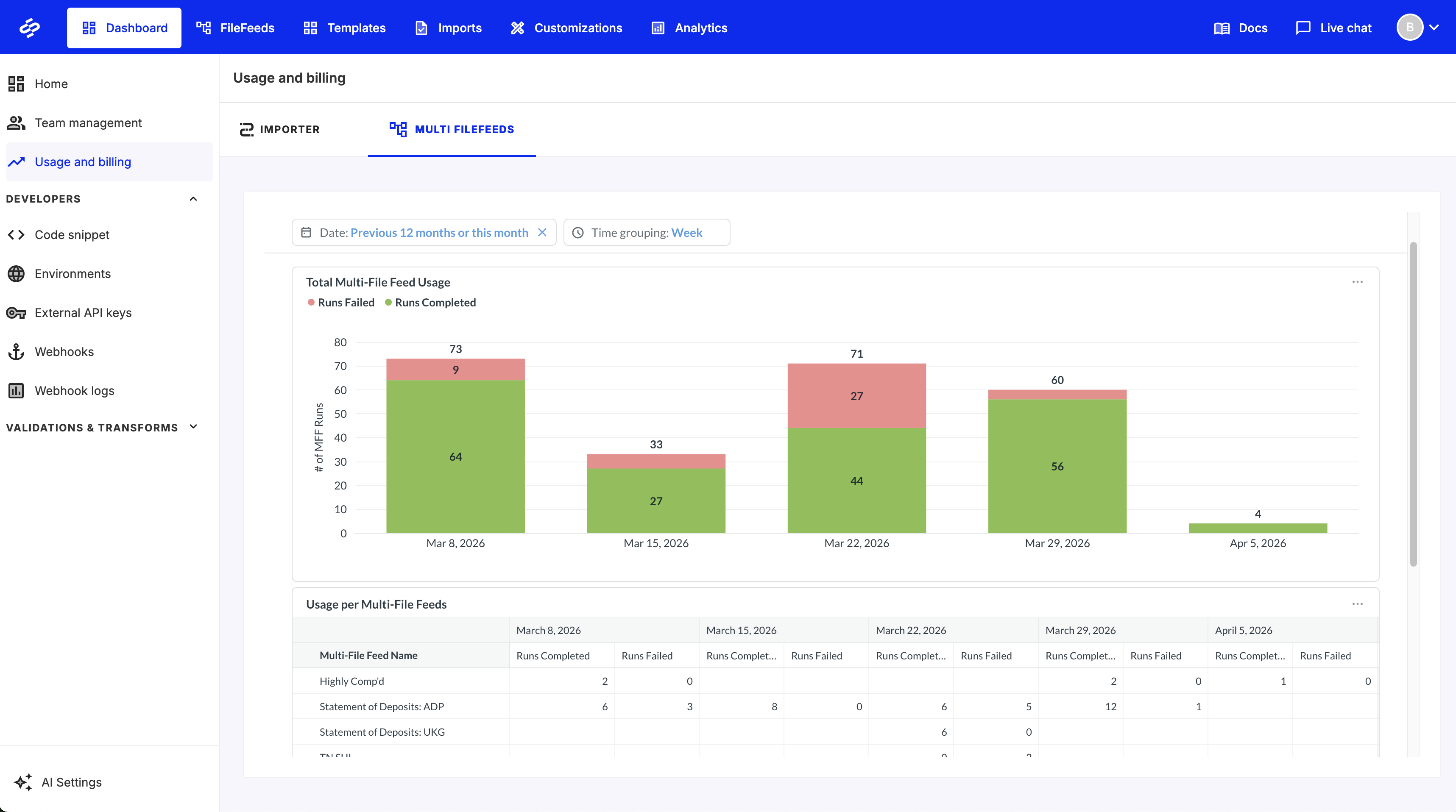
You can now view Multi FileFeeds usage directly within the OneSchema dashboard. A new tab in the Usage & Billing page provides visibility into activity alongside existing Importer metrics, making it easier to monitor usage and track trends in one place.
Improved modal responsiveness in embedded Importer
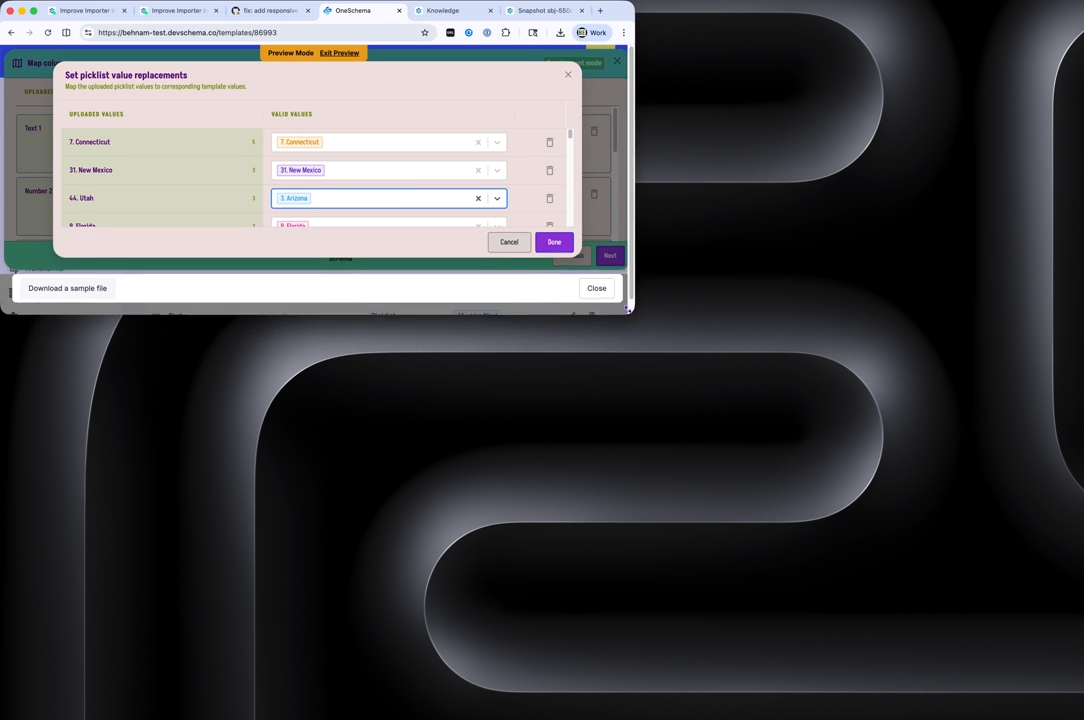
Secondary modals within the embedded and dashboard Importer now use more responsive margins, making better use of available space in constrained layouts. This improves usability in deeply embedded contexts and ensures components like picklists remain accessible even when screen space is limited.
Paginated folders in Single FileFeeds
Folders in Single FileFeeds are now paginated, making it faster to load large lists and easier to navigate and find specific folders as your workspace scales.

Change templates without rebuilding Sheet transforms
You can now switch the template used in Sheet Transforms within Multi FileFeeds without needing to start over. Existing steps are preserved and applied to the new template, making it easier to iterate and correct setup mistakes without rebuilding your workflow.
Redesigned sidebar experience for Multi FileFeeds
Multi FileFeeds now feature a streamlined sidebar experience that brings you directly into the transforms builder when opening a workflow. Imports are displayed in a more compact view, with the ability to download source and output files individually or in bulk—making navigation and file management faster and more intuitive.

Custom SFTP ports for file connections
SFTP connections for both Single and Multi FileFeeds now support custom server ports. This allows you to connect to environments using non-standard configurations, with support available in both the dashboard and API—making it easier to integrate across development, staging, and production setups.
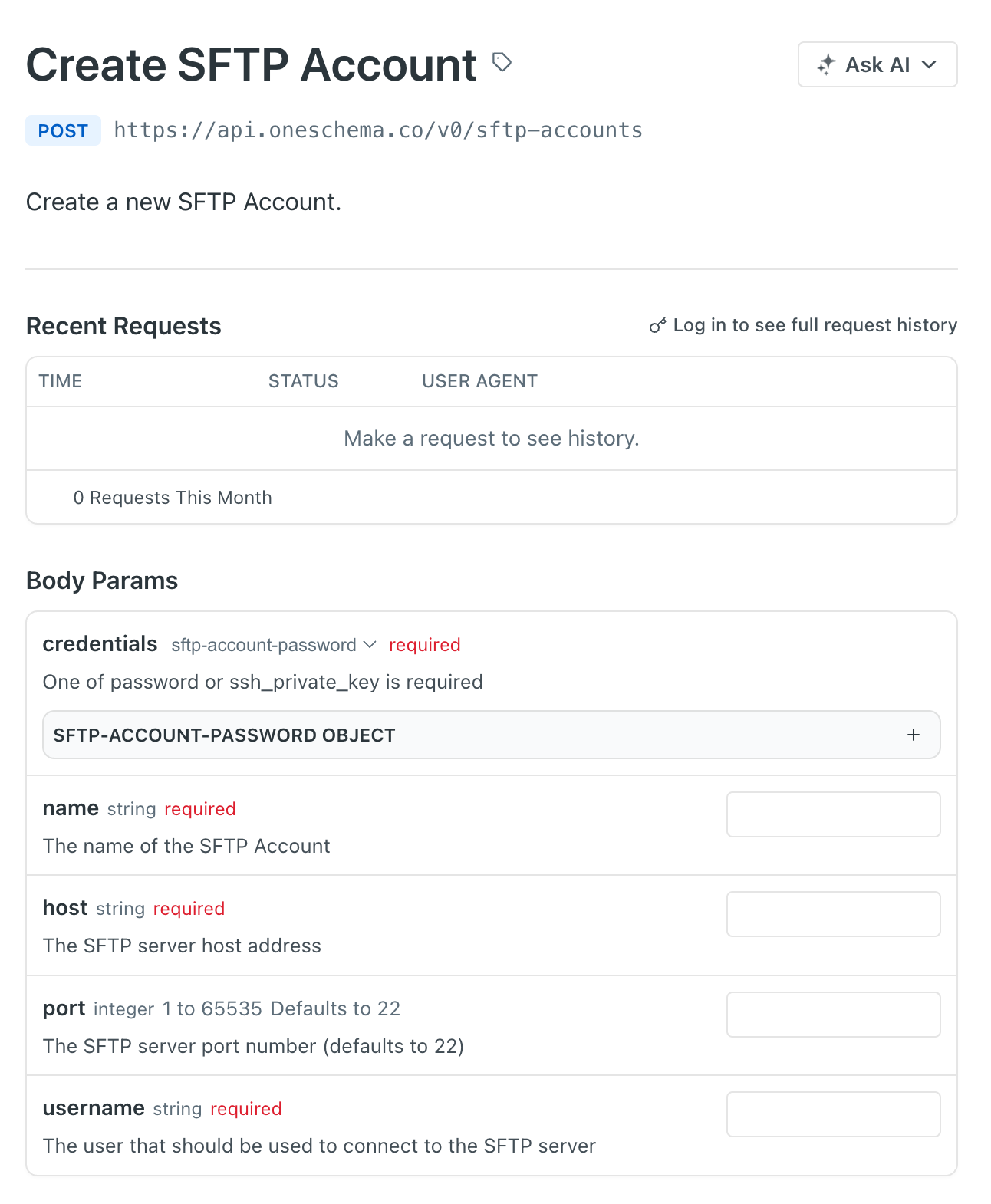
Automatically add missing template columns
Sheet Transforms can now automatically add any missing template columns at runtime. Instead of predefining columns, this feature dynamically detects gaps and adds only what’s needed—ensuring files stay aligned with your template while reducing manual setup and maintenance.
.png)
Remove unmapped columns in Sheet Transforms
You can now automatically remove unmapped columns directly within Sheet Transforms—no custom file transform required. This feature dynamically detects and drops any columns not mapped to your template at runtime, helping keep outputs clean and aligned with your schema, even when processing large files.
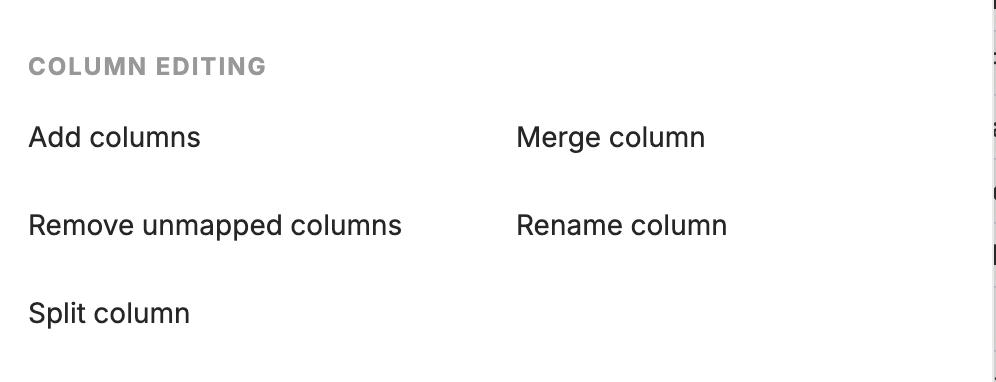
Error details in validated file previews
When previewing validated files from past import runs, you can now see detailed error explanations directly in the read-only view. Highlighted error cells display the same helpful popovers available in the builder, making it easier to understand and troubleshoot issues without needing to revisit the workflow editor.

Direct cloud uploads for Multi FileFeeds via API
Multi FileFeeds now support direct file uploads to cloud storage through the API, reducing the need to route files through OneSchema web servers first. This helps streamline uploads for larger files, avoid unnecessary network and infrastructure overhead, and improve compatibility with customer network environments where direct access to well-known cloud storage endpoints may be easier to allow.
Developers can use our guide to integrate with this upload flow.
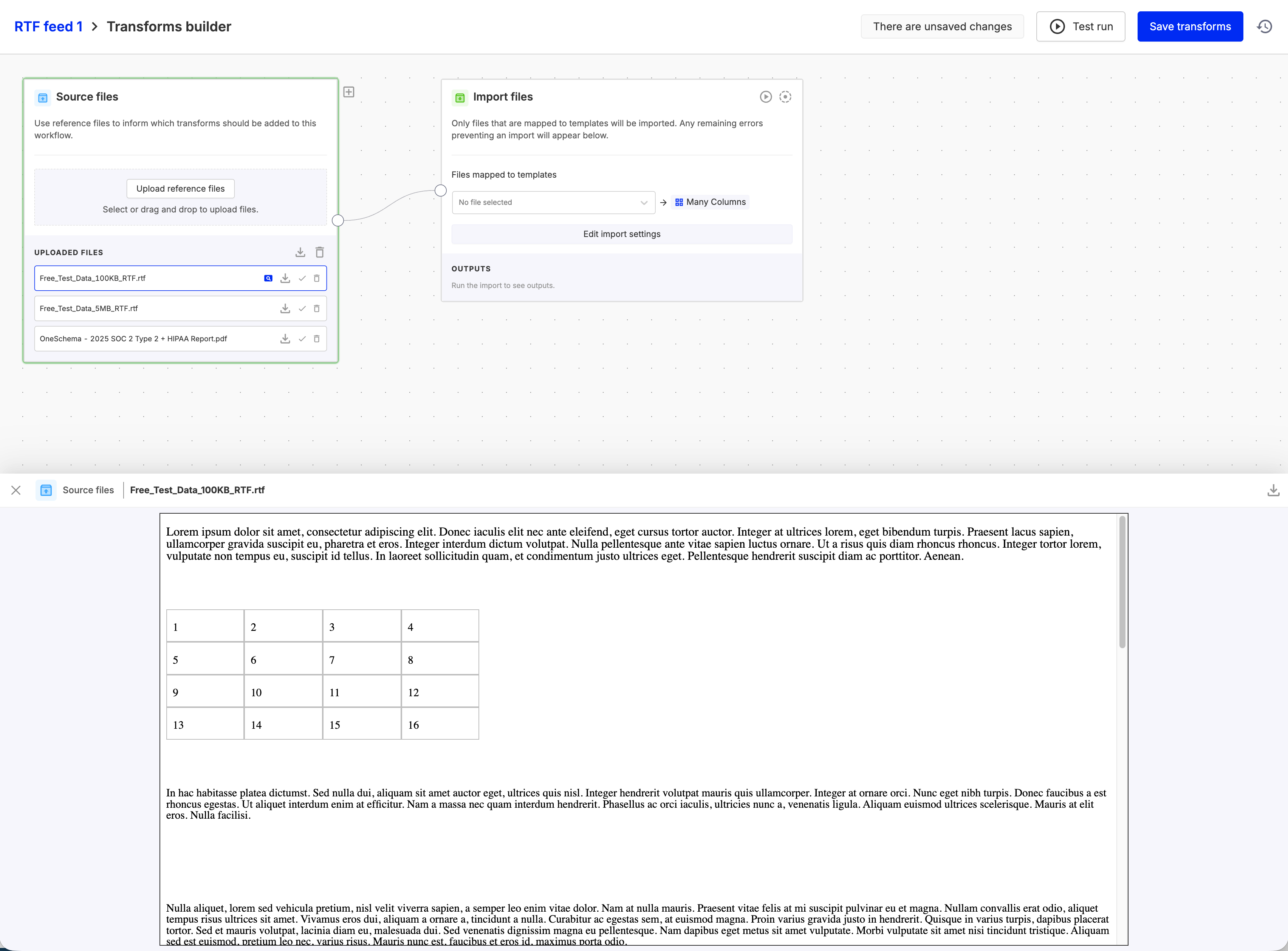
RTF file preview in Multi FileFeeds
Multi FileFeeds now support previewing RTF files directly in the builder. Content is rendered as HTML for easy viewing, allowing you to quickly inspect document contents (excluding embedded images) without needing to download the file.
New node: Validate files against templates
A new Validate Files node brings flexible, template-based validation directly into your Multi FileFeed workflows. You can validate one or multiple files against their respective templates at any point in your flow, making it easier to enforce data quality exactly where you need it.
Validation results are clearly surfaced, with failures showing error summaries and easy access to file previews for troubleshooting. This node also provides a modular alternative to built-in validation, giving you more control over how and when validation is applied within your workflows.
New node: Extract data with AI
A new Extract Data node lets you apply an AI prompt to values in a selected column and automatically generate a new column with the results. This makes it easy to enrich, classify, or transform data at scale without writing custom code.
You can configure the node by selecting your source data, defining a prompt, choosing the column to process, and naming the output column with the option to test on a subset of values before running across your full dataset.
MCP server for AI-powered integrations
We’ve launched a Model Context Protocol (MCP) server that gives AI coding assistants direct, up-to-date access to OneSchema’s API specs and product guides. By connecting your assistant to the MCP endpoint, it can discover endpoints, understand schemas, and generate accurate integration code without relying on outdated documentation.
The server provides read-only access to API specifications and guides over HTTP, making it easy to integrate with tools like Claude, Codex, and Devin.
Global file management for Multi FileFeeds
You can now access all files uploaded into Multi FileFeeds from a centralized Global Files view. This provides a single place to browse, download, and manage files across workflows, making it easier to track and operate on your file data at scale.
API access to Multi FileFeed import errors
You can now programmatically retrieve validation errors from Multi FileFeed imports using a new API endpoint. This makes it easier to integrate error handling into your workflows, automate troubleshooting, and surface issues directly in your downstream systems.
Preview MS Office files in Multi FileFeeds
You can now preview Microsoft Office files (DOCX, PPTX, XLSX) directly in the Multi FileFeed builder. Files are rendered as PDFs for easy in-app viewing, similar to existing text and RTF previews, making it faster to inspect content without downloading.
Preview generation is optimized for large files, with limits applied to ensure a smooth experience. These changes do not affect the original file or download behavior.
Per-file upload progress for Multi FileFeed imports
Uploads in Multi FileFeeds now show real-time, per-file progress with byte-level detail. Each file displays its own progress bar, giving you clear visibility into upload status. This is especially helpful for large or multi-file imports. This experience is available in both the Source Files node and the manual import flow, making uploads more transparent and reliable.
Multi FileFeeds usage dashboard
You can now view Multi FileFeeds usage directly within the OneSchema dashboard. A new tab in the Usage & Billing page provides visibility into activity alongside existing Importer metrics, making it easier to monitor usage and track trends in one place.
Custom SFTP ports for file connections
SFTP connections for both Single and Multi FileFeeds now support custom server ports. This allows you to connect to environments using non-standard configurations, with support available in both the dashboard and API—making it easier to integrate across development, staging, and production setups.
Automatically add missing template columns
Sheet Transforms can now automatically add any missing template columns at runtime. Instead of predefining columns, this feature dynamically detects gaps and adds only what’s needed—ensuring files stay aligned with your template while reducing manual setup and maintenance.
Remove unmapped columns in Sheet Transforms
You can now automatically remove unmapped columns directly within Sheet Transforms—no custom file transform required. This feature dynamically detects and drops any columns not mapped to your template at runtime, helping keep outputs clean and aligned with your schema, even when processing large files.
Error details in validated file previews
When previewing validated files from past import runs, you can now see detailed error explanations directly in the read-only view. Highlighted error cells display the same helpful popovers available in the builder, making it easier to understand and troubleshoot issues without needing to revisit the workflow editor.
Direct cloud uploads for Multi FileFeeds via API
Multi FileFeeds now support direct file uploads to cloud storage through the API, reducing the need to route files through OneSchema web servers first. This helps streamline uploads for larger files, avoid unnecessary network and infrastructure overhead, and improve compatibility with customer network environments where direct access to well-known cloud storage endpoints may be easier to allow.
Developers can use our guide to integrate with this upload flow.
RTF file preview in Multi FileFeeds
Multi FileFeeds now support previewing RTF files directly in the builder. Content is rendered as HTML for easy viewing, allowing you to quickly inspect document contents (excluding embedded images) without needing to download the file.
Environment variables and embed ID in template hooks
Template hooks can now access environment variables when executed within an environment context, enabling more dynamic and environment-aware logic. When run within an embedded flow, template hooks also receive the embed_id, making it easier to tailor behavior based on the specific embed instance.
Column sorting across Importer, FileFeeds, and Workspaces
Spreadsheet views across all OneSchema product lines now support A–Z and Z–A sorting on any column. Sorting is applied alphabetically on a per-column basis, making it easier to quickly organize, scan, and analyze your data directly within the product.
.png)
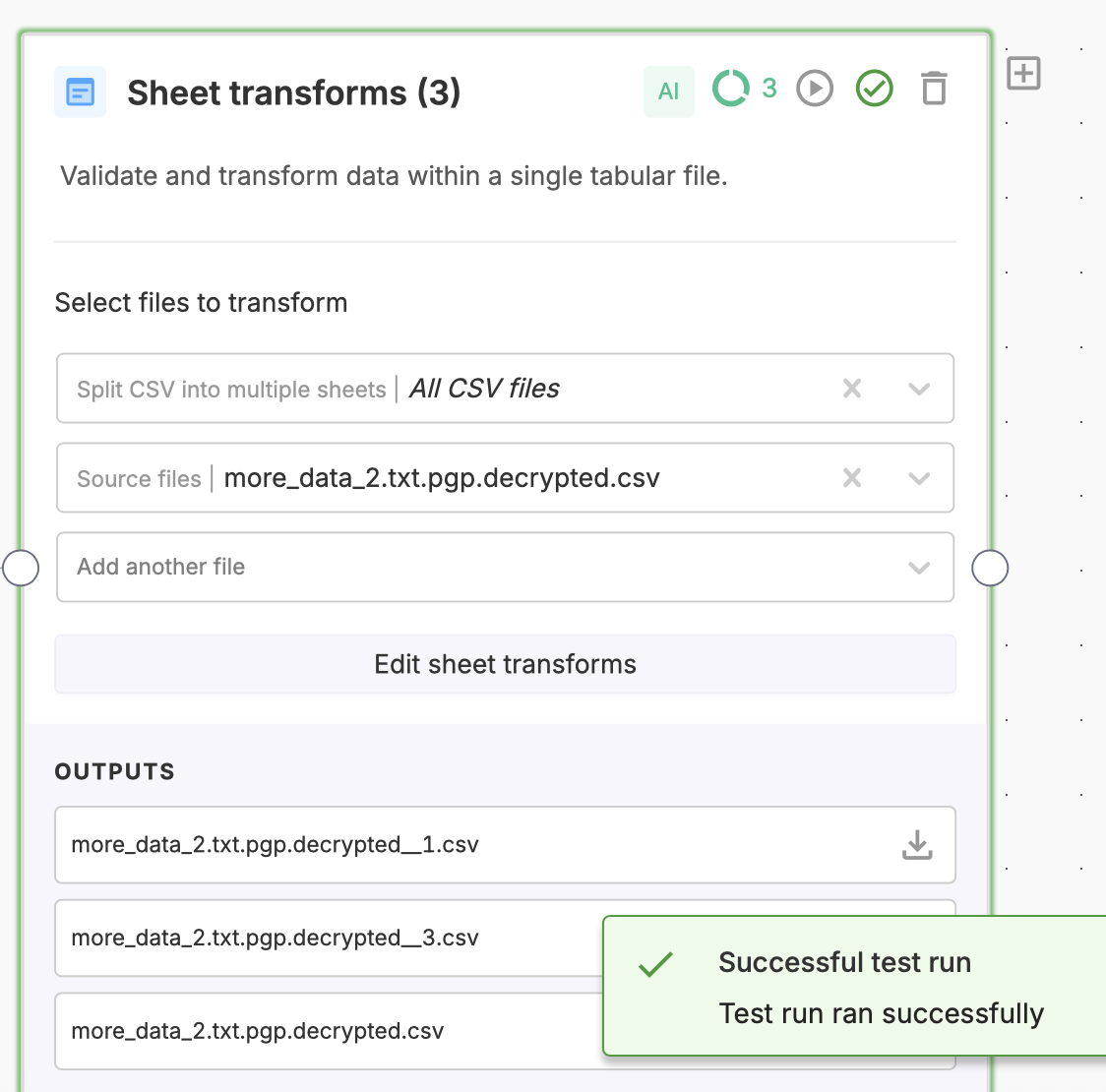
Multi-CSV support for Sheet Transforms
MFF Sheet Transform nodes can now accept multiple CSV files as inputs. All provided sheets will pass through the configured validations and transforms in a single step, making it easier to process batches of files consistently. This capability is now generally available to all MFF users.
Importer usage chart
A new usage chart provides visibility into files imported across all managed instances and regions. You can filter by custom date ranges, toggle dev mode on or off, and group results by month, week, or day, making it easier to monitor activity, track trends, and understand importer usage over time.

Import File Name Renaming
You can now control how files are named during import with additional renaming options. In addition to using the template key, imports can be named based on the template label, the original incoming file name, or the slot file name. This makes it easier to align imported files with your internal naming conventions and downstream systems.
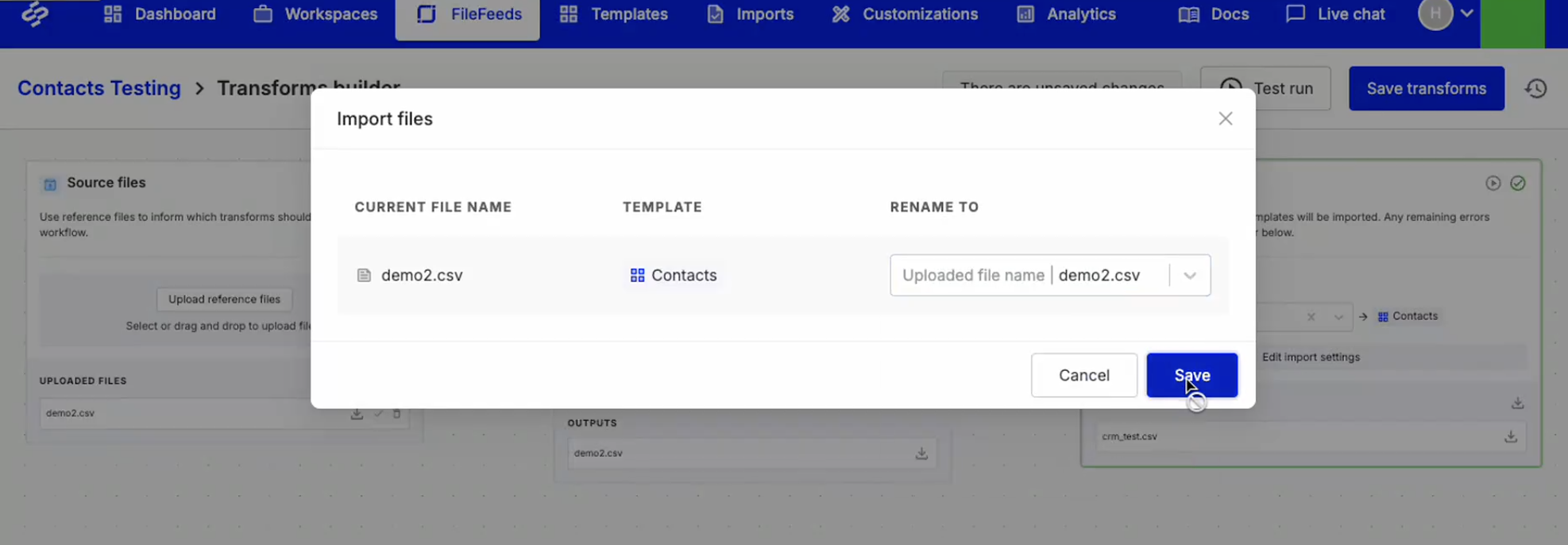
New MFF node: Split CSV into multiple sheets
A new Multi FileFeed node lets you split large CSV files into multiple smaller sheets based on a configurable row limit. Each output sheet preserves the original headers and column structure, and files are clearly named based on the starting row of each split. This makes large datasets easier to process, review, and route through downstream workflow steps.
To ensure reliability, each input sheet can produce up to 100 output files. If a split would exceed this limit, the operation will fail with a clear error message.
Node Output File Downloads
You can now download output files from any node in a workflow, not just the source or import steps. Files are accessible directly from the Node Outputs list or the file preview drawer, and this works across all supported file types, including CSV, XLSX, and PDF. This makes it easier to inspect, share, and debug intermediate results.

View and edit code for AI-generated Sheet actions
AI-generated custom Sheet actions now include an option to open a code editor, giving you full visibility and control over the generated logic. The original prompt used to generate the code is preserved at the top of the file as a comment, making it easy to understand, review, and iterate on the behavior.

Multi FileFeed Event Webhooks
Multi FileFeed workflows now support event-based webhooks, allowing external systems to be notified when imports succeed or fail. These webhooks run on non-builder workflow executions and send useful context to your endpoint, including the event type, Multi FileFeed metadata, and the original uploaded file names.

Custom File Action Logging
You can now capture log output from MFF code actions directly in the Custom File Action node. By using the built-in log utility instead of standard console logging, logs are written to a file that’s viewable both in the Custom File Action configuration modal and in the node’s outputs—making it easier to debug and inspect execution behavior.

API generated templates for Multi FileFeeds
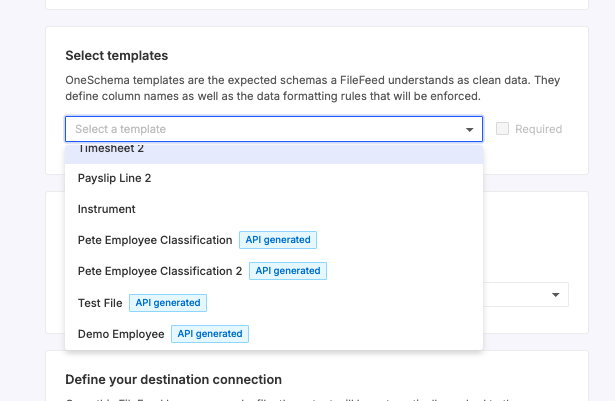
Custom Transform Name and Description Multi FileFeeds
Multi FileFeeds' transforms can now be renamed and given a custom description. To change either of these, click on the existing name or description that you want to change and enter the new one. These changes will persist across sessions. To unset changes, you can do so by clearing the field value to return them to the default.

Multi FileFeeds PDF Extraction: Configure Columns in UI
You can now configure which columns to extract from PDFs directly in the UI, improving accuracy and eliminating the need to write prompts.
.png)
Multi FileFeeds Transform: Extract Specific Worksheets (by name) from Excel Files
A new transform now lets you extract specific worksheets from Excel files, by worksheet name.

AI Picklist Mapping in Multi-FileFeeds
AI can now classify column values into picklist values based on training data provided by the user, adding automated mapping capabilities to Multi-FileFeeds.

External Collaborators for Workspaces
Customers can now invite external users to specific Workspaces via email, allowing them to view and edit data, update template mappings, and export data without needing full organization access.
.png)
AI Code Generation for Post-Mapping Code Hooks
Prompt-based AI code generation for post-mapping code hooks: click Generate code and enter the prompt. This generates the code inside the editor that you can modify further.

AI Code Generation for Validation Code Hooks
Prompt-based AI code generation for validation code hooks. You can specify in the prompt to generate Warnings (highlighted in yellow, non-import-blocking) or Errors (highlighted in red, import-blocking) - by default, it generates Errors. You can also specify in the prompt to return suggestions.

Custom Metadata for Workspaces
Enables custom_metadata in JSON for Workspaces - you can now add custom metadata to associate it with all the exports for a particular Workspace.
.png)
FileFeeds AI Transforms
AI Transforms are now available inside the FileFeed buider. You can either click on any error and choose "Apply a transform using AI", or go to Transforms > Add transform > Create a custom transformation with AI.
Then you can write a text prompt, e.g. "delete rows where TAXNO is empty". This adds a step to your transformation pipeline, and this step is not shareable with other FileFeeds.
.png)
FileFeeds AI Column Mapping
FileFeeds users can now use AI Column Mapping to map any columns that haven't been mapped yet. Before applying these mappings, you can preview it in the Transforms tab.
.png)
FileFeeds AI Code Generation
FileFeeds Custom Code Actions are code transformations equivalent to code hooks in Importer, but parametrized. There are two categories of custom code actions: Data Setup (similar to post-upload hooks in Importer), and Transforms (similar to post-mapping hooks in Importer), we added prompt-based AI code generation for the latter.
Go to Custom Code Actions and create a Transform - you'll see "Generate code" next to the code editor. This generates the code inside the editor that you can modify further, and once saved - it can be added to any FileFeed.

API Error Detail Reports
An API endpoint to generate a CSV of every cell error remaining in the FileFeed import, broken down by row. Returns a URL to download the CSV. Please find the docs here: https://docs.oneschema.co/reference/generate-file-feed-import-error-details
.png)
Environments for FileFeeds Imports
Users are now able to set the environment for FileFeed ingestions (SFTP pulls) and manual imports. This unblocks using the same FileFeed to do imports with different environment variables.
.png)
FileFeeds Partial Imports
We’ve added support for partial imports in FileFeeds. By default, imports with errors will be blocked, but users can now choose to import the clean rows automatically and fix or export the errors later.
- There's a new Partial Import status in the Import Activity tab.
- This is a terminal status, meaning:
- Partial imports can’t be retried manually and won’t prompt for a new upload.
- They can be marked as resolved.
- This is a terminal status, meaning:
- Clicking into a partial import attempt shows:
- How many rows were successfully imported vs. the total rows.
- Download options for filtered versions of the transformed file, including an Excel file with highlighted error rows.
- There's a new webhook event:
file_feed_import_partial.- Set up your
FileFeedEventwebhook to listen for partial imports. - The event payload includes total row count and error row count, following the same JSON structure as our other webhook events.
- Set up your
To enable partial imports, go to FileFeed Settings > File status options if error rows remain > Import clean rows.

FileFeeds Bulk Find & Replace
New transform in FileFeeds: Replace multiple values (AKA Bulk Find & Replace) allows you to perform find & replace transform on multiple columns and with multiple options inside one transform block. It is case-insensitive by default, but has a case-sensitive flag.

FileFeed Folder API
AI-Suggested Mappings and 1-click mode are now public
AI-Suggested Mappings and 1-click mode are out of Beta and are available for all customers. You can now leverage AI for helping with mapping columns and picklists.
Customers can also use 1-click mode to seamlessly drag and drop any file and OneSchema will automatically map and apply any transformations to the uploaded file.

Template API Update
A new set of APIs to programmatically manage templates and template hooks. New functionality now available:
- Create / Read / Update / Delete code hooks and/or native template hooks (previously, it was only possible to create and delete code hooks).
- Update a template via API
- Push template to environment(s) via API
FileFeed Folders

Text Replacements for Embedded FileFeeds
Users can add text replacements for FileFeeds (within the same customization). Under the User Education tab, users can toggle between Importer and FileFeeds to see the different options.

Environment selection enabled for Embedded FileFeeds
You can now specify the environment and allowed domains for embedding FileFeeds in the developer dashboard.

Enterprise SSO
OneSchema now supports single-sign-on (SSO) and Security Assertion Markup Language (SAML) authentication to manage authentication and access to the OneSchema dashboard.
.png)
Multi-sheet selector for FileFeeds
Users can now specify which sheet in a multi-sheet Excel file to use in the FileFeeds product. If a user does not specify, the first sheet will automatically be the one selected for upload.

Public version of FileFeeds embedding SDK in JS + React
Importer SDK versions 0.6.0 and 0.7.0
A new version of our SDKs for the Importer (0.6.0) is now available for all 4 supported frameworks: JS, React, Vue and Angular.
- Added compatibility with OneSchema FileFeeds packages.
- Exported TypeScript types in Importer React package.
- Dropped TemplateGroups feature.
- Added tslib as direct dependency.
Importer React SDK 0.7.0 update: inline prop is defaulted to true
When upgrading to this version, if you still need the non-inline behavior, you could set inline={false} explicitly. Or, you could switch to the inline rendering (which is more native to React environment) and adjust your style attribute and CSS rules to achieve the desired UI presentation.
Webhook Logs for all webhooks
OneSchema now has logs for all types of supported webhooks:
- Importer Event webhooks
- Importer Metadata webhooks
- FileFeed Event webhooks

XML Pre-Parsing Hook
.png)
Pipelines JSON to CSV Pre-Parsing Hook
The new “JSON to CSV” pre-parsing hook for Pipelines allows you to extract fields from JSON: it creates a new column for each key in the JSON object and fills the cells with the respective values. The feature also supports array de-nesting: it duplicates the row for every array item.

Custom JSON Metadata for FileFeeds
Users can now set custom JSON metadata on FileFeeds via the settings page or via API. The metadata will be attached to validation webhook payloads, import webhook payloads, and to JSON file exports as file_feed_metadata. There is a 2000 character limit and this metadata will not be attached to CSV exports.

FileFeed Import Webhooks Destination
Users can now use an import webhook as a file feed destination! Note that import webhooks for the Importer and FileFeeds product are separate - you may find tabs on the webhook page in your dashboard to delineate between the two.

Manual Fix for FileFeeds
Users can now manually fix file feed errors: open a FileFeed run that has “Error rows remaining”, click “Manually fix errors”, and it will open the familiar experience that OneSchema Importer users know as “Review & finalize.”

Saving Deleted Columns in Historical Mappings
If an end-user clicks on the “bin” icon next to a column on the Mapping step (which triggers the “This column will not be imported” message) - this action will now be saved in historical mappings, and reapplied for future uploads with the same column names.

UPC, EAN, IMEI validation types
We're excited to announce the addition of 3 new validation types:
- UPC (Universal Product Code): is a barcode symbology that is used worldwide for tracking trade items in stores.
- EAN (International Article Number or European Article Number): A superset of UPC.
- IMEI (International Mobile Equipment Identity): a numeric identifier, usually unique, for mobile phones.

Fixed Width File to CSV Converter
This newpreparsing hook allows you to accept fixed width files (e.g. TXT, DAT) and convert them to CSV.

Choose an Export Format for FileFeeds
Users can now specify a desired export format for their FileFeed output via the settings pane. Currently, CSV and JSON are supported.
.png)
Advanced Excel Preparsing Hook
We've launched a new preparsing hook that can be used for advanced Excel parsing. One example use case for this is the ability to ignore Excel's scientific notation formatting.

File Filter for FileFeeds
Users can specify a regex for filtering which files are processed from their FileFeed source. This is applied at the FileFeed level and can be changed in FileFeed settings or upon instantiation of a new FileFeed. Files in the source directory that don't match the regex will be ignored.

Multi-Mappable Columns
Customers can now specify a template column as multi-mappable, which allows your users to map multiple uploaded columns to the same template column. This enables better functionality for use cases such as aggregating multiple columns into a single column, and managing validation of multiple columns of the same type.

Custom Downloadable Excel Template
We're excited to just expand the capabilities of theExcel template file that your users can download during the import process! This new feature enables you to upload a custom file in place of our default generated one. You can find the configuration for this in the Settings tab of each template. Please note that the customization must be enabled for the download button to appear in the importer.

Validation Hooks page: a new Columns column
We've launched a new column to the table of Template Validation Hooks, listing the Template Columns attached to each hook. This is to help template owners manage and verify the hooks in use.

Access Control
Access Control is a feature that is now available for all Enterprise customers! With Access Control, three user roles are available:
- Admin: This user can manage your team’s access to OneSchema in addition to the Developer role’s permissions.
- Developer: This user will have access to the full OneSchema product experience. This includes templates, environments, API keys, webhooks, customizations, and analytics.
- Analyst: This user is able to view imports in Import Activity

Locked Columns
The new Locked Columns feature allows template owners to lock the value of specific columns, which is useful for fields where you don't want users to be able to edit certain data types. Once locked, the cells in these columns will be read-only, highlighted with a darker gray background, and have a popover indicating their lock status. If there are any errors/warnings for these cells, the error/warning message is displayed as before. Autofixing and accepting suggestions is enabled, however, manual edits are not.

New sheet_operation_performed event
With our new sheet_operation_performed event, you'll now be able to receive event webhooks for all events that happen on Pane 4. This gives you greater insights into the end user behavior which helps both with finding ways to improve your product, as well as building in-depth auditing capabilities.

Add a row during upload
We've launched a new customization that allows your users to add a row to uploaded files in importer! The added row will always appear at the end of the file.

Template Environments Update and Unpushed Changes
We've launched a new experience on template pages around environments that will enable admins to better manage making and pushing changes to templates. Admins will now see UI on the All Templates page that indicates which environments a template was last pushed to, and UI that indicates the number of changes made to a template that have not been pushed.

Frequent Error Types
Frequent Error Types has now been added to the Importer Analytics! This lets you see which columns your users are experiencing the most validation errors on the Review & Finalize pane.
.png)
Event Webhooks
For complex use cases where diving even further into analytics is necessary, Event Webhooks allows you to see data around the following events:
- Embed Initialized
- Embed Resumed
- Embed Closed
- File Uploaded
- Header Selected
- Columns Mapped
- Import Submitted

Importer Analytics
Importer Analytics unlocks powerful information about how your customers are interacting with your importer. From here, you can see data like conversion percentages, time spent per pane, and frequent errors your customers are encountering.

Import activity search filter
The new search filter on Import Activity provides a more seamless experience by enabling you to filter import activity across template_key, original file name, and user_id.

New Warnings Experience
We've made updates to our pane 4 experience to create a better experience when the uploaded file has warnings. With this new experience, when your user clicks the "Rows with issues" tab, they'll see a dropdown which allows them to filter on only errors OR only warnings. They'll also be able to filter on warnings for a specific column with the new warning pills, and the error sidebar now separates warnings from errors.

Additional error resolution actions
Our newly launched column level error resolution actions in pane 4 allow your users will to access the predefined actions via error popover and via column header dropdowns. This gives them more flexibility and options when it comes to bulk fixing their data, enabling an even easier data cleaning experience!

Import max row limit
We've added a customization that allows customers to add a maximum row limit that can be imported, and they can also add an optional custom header and description message for this error. When this customization is active and there are more rows than the specified limit, we will display an error in the importer and block the user from continuing with the import.

Education widget
We've added a customization option that allows you to add education widgets to your importer! This enables you specify different widgets for each of the 4 Importer panes, have it default open or closed, and supports markdown.

Template Columns Education
This new customization option under the "User Education" tab enables an informational sidebar on the mapping pane for your users. This will display a green check next to columns that have been mapped, and update dynamically as users select their mappings.

Picklist Descriptions
With Picklist Descriptions, you can now use template overrides to set descriptions for each individual picklist option. These will be displayed in each dropdown of the OneSchema importer:
- Picklist mapping
- Picklist cell editing
- Picklist error popovers to replace all

Accept all suggestions
The cell popover for errors and warnings with suggestions now has a new button, "Accept for X cells". Clicking this button will accept all suggestions for cells in the column that have exactly 1 suggestion, making it even easier for your users to clean their files. The button will appear for users if there are at least 2 cells in the column which have exactly 1 suggestion.

Sample data file generator
Users now have the ability to generate a sample test file for a template, eliminating the need for a file on hand to experience the importer. The button to generate a sample file lives can be found in the sandbox preview below the importer. The generated data will mostly conform with the template column options, but the data may not be 100% valid according to the template.

Alternative Picklist Names
Our new Alternative Picklist Names feature enables you to specify one or more "alternative_names" for each picklist value via template overrides. If any of the alternative names appear in the uploaded file, they will automatically be mapped to the picklist value.

EU Number Format
The number data type now has a new selection for the format, either be "US" (the default), or "EU". The EU number data type uses "," as the decimal separator and "." as the thousand separator.

Fullview integration
OneSchema now supports Fullview as a screen recording provider, allowing customers to analyzing recordings of their customers using OneSchema and optimize the experience.
.png)
New Boolean data type
Our new Boolean data type feature allows users to define true and false values more easily.
.png)
Required Column Groups
Customers can now use the "Required Column Groups" feature to set that at least one column in a group must be mapped.

Customizable Picklist Colors
You can now set specific colors for each picklist option! A list of 10 default options are provided, but exact HEX values can be used as desired.

OneSchema Pipelines
OneSchema Pipelines lets non-technical team members (account managers, operations) setup recurring CSV integrations with your customers’ complex data feeds without engineers getting involved. Map, transform, and ingest CSV files via SFTP, API, or email without needing to write a single line of code.

Import template as JSON

Environments General Availability
Environments allow you to safely push and validate changes to templates in stages to align with the environments in your deploy process.
OneSchema automatically sets up environments for Production, Staging, and Development. See our guide on custom environments to set up custom environments.

Transpose file
A new post-upload hook now exists for transposing (swapping the rows and columns) of a file.

Specify expected date formats for template columns
Admins can now specify the particular date format that’s expected for template columns instead of relying on OneSchema’s date detection (which defaults to a month, day, year interpretation). This impacts scenarios where a file’s uploaded date column contains a majority of ambiguous dates, and the format is not MM/DD/YY (e.g. 01/02/2022 can be either January 2nd, 2022 or February 1st, 2022).

Row deletion customization
For some customers, an end user deleting a row of data prior to import can break their entire flow. We’ve added a customization option that allows you granular control over how and if the end user should be able to delete rows from the Review & Finalize pane.
String Replacements customization
String Replacements allow you to change the headers and buttons of every step of the importer. This can be helpful if there’s an existing string inside of the importer flow that you feel could be edited to better fit your existing brand (or use case).
Multi-cell copy and paste
To better support end users with bulk error resolution, we’ve improved our copy and paste functionality on the Review & Finalize pane to enable multiple cell copying and pasting.

Import metadata via webhook
Rather than sending batched rows of data to a customer webhook, sheet metadata can now be sent via webhook. This is significantly faster and also enables you to directly use the metadata to retrieve data via external API (e.g. GET rows for paginated JSON or POST sheets for S3 URL download of CSV/excel/JSON).

Currency symbol validation support
OneSchema’s money data type validation and autofix feature now supports the Pound (£), the Euro (€), and the Yen (¥) currency symbols.

JSON object data type validator
Pre-built Transforms and Advanced Validations

Auto-save for Custom File Transform code
Code in the Custom File Transform editor is now automatically saved when you close the editor. You can safely navigate away or check other parts of your workflow without losing your work, making iteration faster and more reliable.
Expandable file preview in Multi FileFeeds
File previews in the Multi FileFeed canvas can now be expanded to full browser height, making it easier to review and work with larger datasets. Simply use the expand option in the preview header to switch to a more spacious view.
Multi FileFeed builder UX improvements
We’ve rolled out a series of enhancements to the Multi FileFeed builder to make workflows easier to build, navigate, and understand:
- Clearer workflow visuals: Edges now use structured right-angle routing for improved readability.
- Faster node editing: Add steps anywhere in your flow with a new inline insert option, while keeping existing connections intact.
- Keyboard shortcuts: Quickly access common actions like test runs, auto-layout, and zoom controls via a new shortcuts panel.
- Smoother interactions: Improved drag indicators, hover states, and stable viewport behavior create a more predictable editing experience.
- Enhanced file previews: Preview images and Office files directly in the builder with zoom and navigation controls.
Together, these updates make it easier to build, debug, and iterate on complex workflows.
More flexible SFTP scheduling with minute-level control
SFTP pull schedules for FileFeeds and Multi FileFeeds can now be configured in 5-minute increments, giving you more precise control over when data is ingested. This allows workflows to start closer to when files arrive, reducing delays and improving timeliness, while existing schedules continue to run as configured.
Environment selection for manual MFF imports
You can now choose which environment a manual Multi FileFeed import runs against directly from the import modal. Import records also display the associated environment in the imports table and canvas sidebar, providing clearer visibility and control across environments.
List view for Templates page
The All Templates page now includes a list view option, allowing you to switch between the existing card layout and a more compact table format. This makes it easier to scan, compare, and manage templates at scale.
Inline selection for “Call Multi FileFeed” nodes
You can now select and update the target Multi FileFeed directly within the “Call Multi FileFeed” node (no separate modal required). This streamlines both creation and editing, and brings the experience in line with other nodes like Sheet Transforms.
Improved modal responsiveness in embedded Importer
Secondary modals within the embedded and dashboard Importer now use more responsive margins, making better use of available space in constrained layouts. This improves usability in deeply embedded contexts and ensures components like picklists remain accessible even when screen space is limited.
Paginated folders in Single FileFeeds
Folders in Single FileFeeds are now paginated, making it faster to load large lists and easier to navigate and find specific folders as your workspace scales.
Change templates without rebuilding Sheet transforms
You can now switch the template used in Sheet Transforms within Multi FileFeeds without needing to start over. Existing steps are preserved and applied to the new template, making it easier to iterate and correct setup mistakes without rebuilding your workflow.
Redesigned sidebar experience for Multi FileFeeds
Multi FileFeeds now feature a streamlined sidebar experience that brings you directly into the transforms builder when opening a workflow. Imports are displayed in a more compact view, with the ability to download source and output files individually or in bulk—making navigation and file management faster and more intuitive.
Code Action usage in Multi FileFeeds
The Custom Code Action details page now shows which Multi FileFeeds the action is attached to. Clicking the “Used in X Multi FileFeeds” tag opens a modal with a linked list of all associated workflows, making it easier to understand dependencies and manage changes with confidence.
Note: This visibility currently applies to Multi FileFeeds only.

Folders for Multi FileFeeds
Multi FileFeeds now support folders, bringing the same organizational capabilities available in Single FileFeeds to the Multi FileFeeds experience.
Newly created Multi FileFeeds will be placed in the Team Workflows folder by default, making it easier to keep workflows organized and scalable as your team grows.
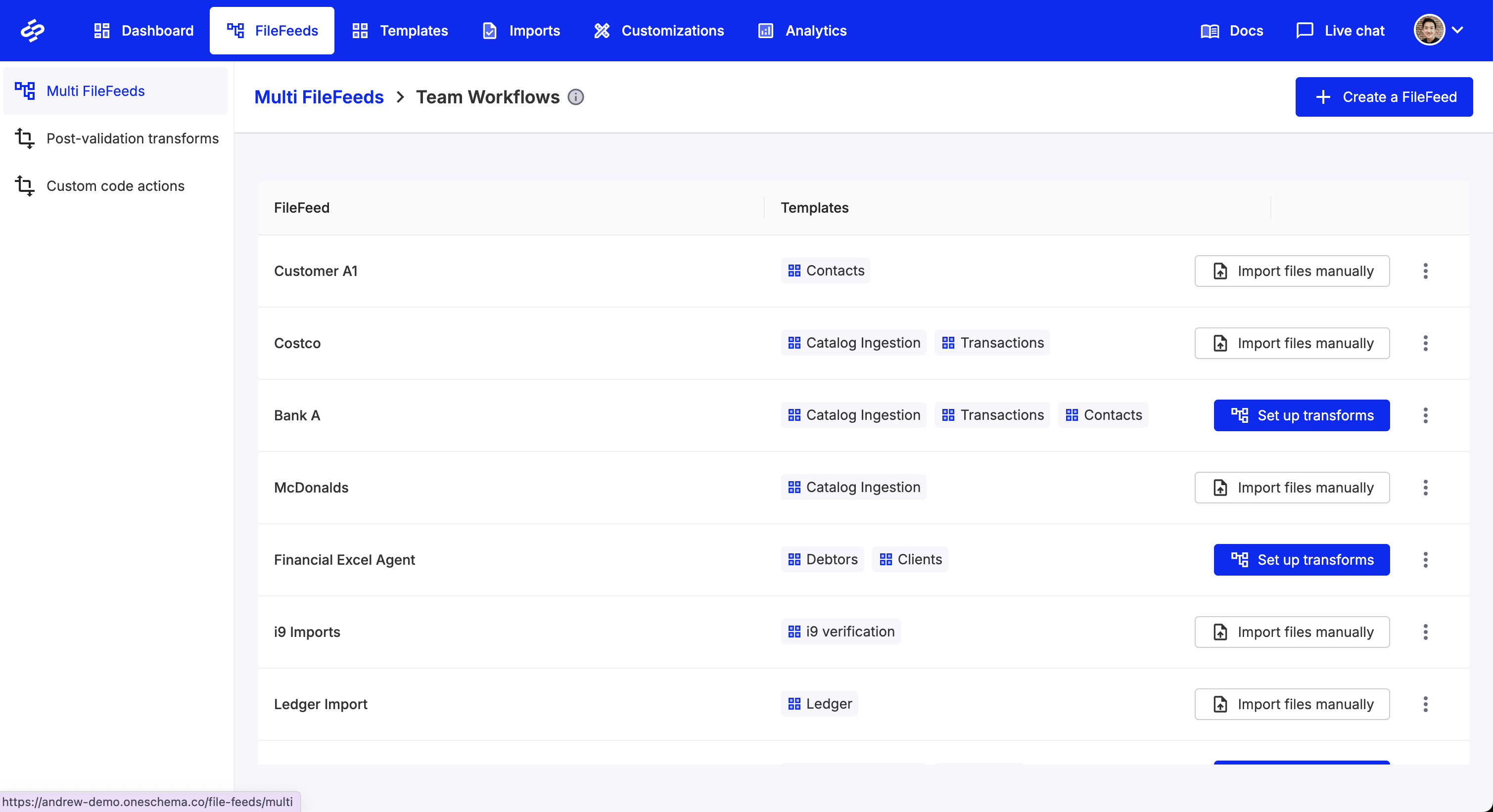
Sheet transforms open as modal in the MFF Transforms Builder
Non-agentic Sheet transforms now open in a modal, bringing them into alignment with the rest of our file transform experience. This update resolves several edge-case issues and improves overall stability.
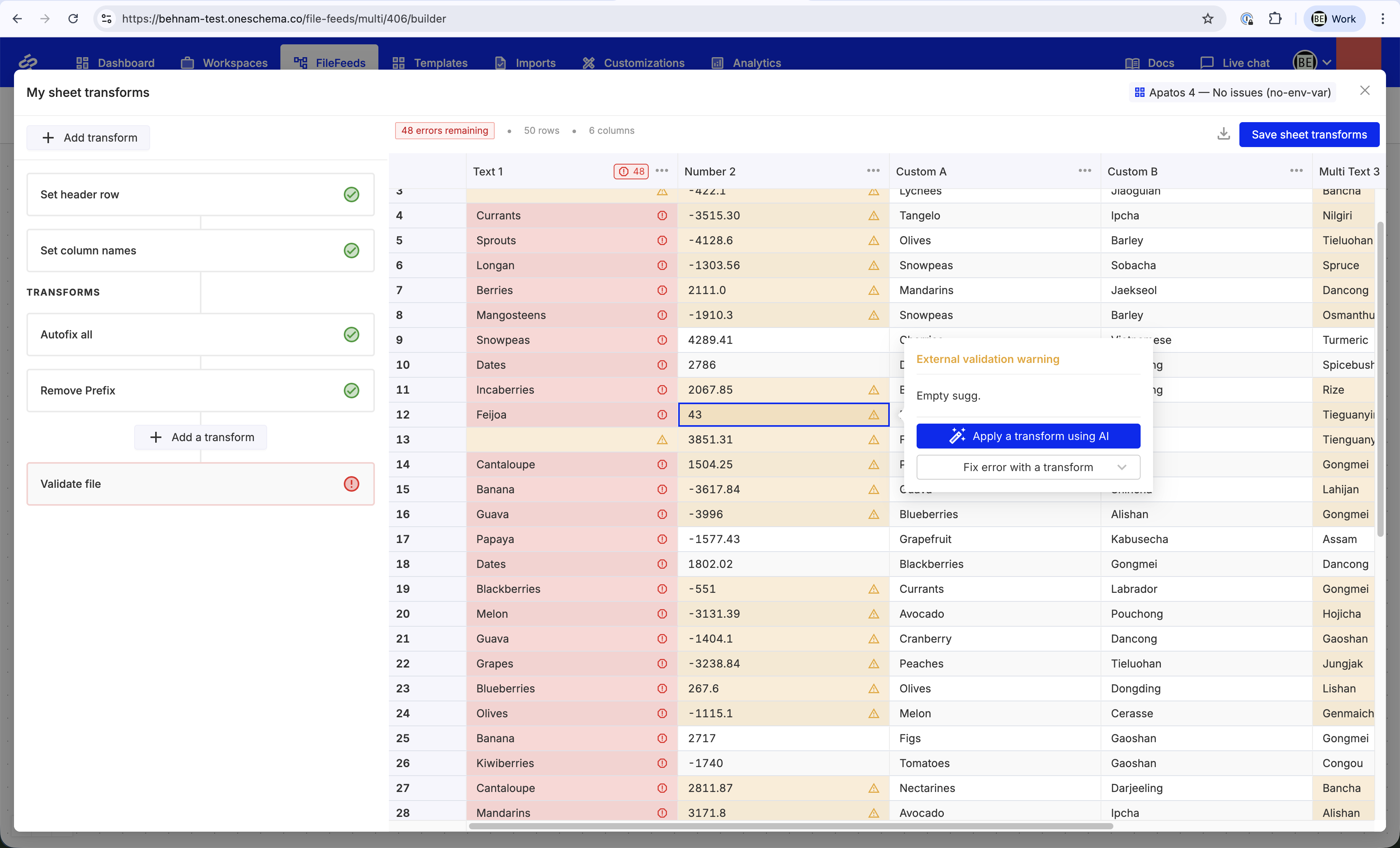
Show Template Usage in FileFeeds
Template details pages now display usage information for both single and multi FileFeeds, with deletion disabled for in-use templates.
.png)
Email Login for External Collaborators in SSO Organizations
External collaborators in SSO-only organizations can now log in using a secure email magic link, while internal users remain restricted to SSO.
.png)
Advanced Excel Parsing: Extract Hyperlinks
The Advanced Excel Parsing option "Extract hyperlinks" now also supports `=HYPERLINK` formulas.
.png)
Bearer User JWT Authentication for Webhooks
Bearer User JWT token is now supported as an authentication method for webhooks. With this auth method enabled, the users will receive Bearer {{userJWT}} in the header for webhooks requests. This is a more secure method of authentication and should be useful to customers that have an API gateway to handle webhook authentication.
.png)
Importer SDK updated to v0.7.1
All the Importer SDKs (JS, React, Angular, Vue) have been updated with:
- TypeScript types for validation options on Template Overrides
- Added
is_lockedparameter to prevent end-users from editing a column on Review & Finalize screen - Other small improvements, please see SDK Changelog for details
Warnings Behavior Customization
Warnings highlight a cell in yellow (unlike red for Errors) and show the end-user a message. They can be created by validation code hooks or validation webhooks. In Importer, Warnings can also show suggestions.
When receiving the imported data from OneSchema, the default behavior for Warnings is that warning rows are considered error rows. This can be now be configured for both Importer and FileFeeds product - please find a detailed doc here.

FileFeed Events for SFTP Ingestion Success and Failure
Two new FileFeed event types, so users can be notified on SFTP ingestion success and/or failure. Please refer to the FileFeed Event Webhooks doc.
FileFeeds Folder Sorting
As the number of FileFeeds folders in your account grows, it is now easier to find them with sorting.

FileFeeds Case-Insensitive Mappings
FileFeeds now support case-insensitive column mappings. For example, if your FileFeed mapping expects name but a new file comes in with Name in the header - that file will now auto-map correctly and theimport won’t error.
FileFeeds Pull Time Configuration
You can now set the exact hour for your daily FileFeeds to run. Previously, all FileFeeds ran at 16:00 UTC (9 AM PT) by default. Now, you can choose any specific hour that works best for your workflow.
.png)
Bulk Find & Replace for Picklist Values in Importer
You can now bulk find and replace picklist values directly from the Review & Finalize screen in Importer. 🎯
Here’s what’s new:
- Define picklist replacements via the modal.
- Use AI-powered mappings (if enabled in your customization).
- Any find & replace mappings set here will be saved for historical picklist mappings, making future imports even smoother.

Exporting Template Versions
Users can now export their template version to JSON. This allows customers to revert to an old template by exporting a previous version then importing it back as a new template.
.png)
FileFeeds UI Statuses
We now support the ability to see the last run and status for FileFeeds within a FileFeed Folder.

Downloadable template CSV support
We now support CSVs to be uploaded as the downloadable template. Previously, it only supported Excel formats.
.png)
FileFeeds SDK updated to v0.5.0
The FileFeeds SDK has been upgraded to support session tokens!
- Support for session_token as an initialization and launch parameter. When a session_token from an existing, valid session is passed along with a corresponding JWT, the session will be resumed. The session_token will be included in the init_succeeded and saved event data payloads, and the session_id will no longer be returned.
- By default, OneSchema will automatically save the session_token and resume the session if it was not closed through normal means (e.g., browser closing or refreshing). However, the session will not resume if the user cancels it or if it ends.
FileFeeds Mapping + Transforms experience updates
- Pipelines are now built into FileFeeds and called Transforms
- FileFeeds now respect pushed templates (relying on the latest template version pushed to the Production environment)
- Change history: you can now see the history of saved transforms per FileFeed
- New bulk action & pop-up: “Missing required columns”, clicking on “Add all missing columns” forces all required template columns onto the FileFeed
- “Save transforms” button moved to the top right corner of Transforms
- When uploading a new sample file to a FileFeed, the column mapping modal auto-opens
- Sample file columns mapped to template columns are now highlighted by a green “MAPPED” badge
- Other minor UI/UX updates

Support for 50M row files
We've increased the efficiency of our Rust data infrastructure, allowing support for uploading even larger files than before (up to 50M rows). Note: performance will be affected if code hooks are used, depending on the complexity of the code hook.
Code Hooks API
We've launched additional endpoints for creating code hooks via the API to allow you to easily manage your code hooks locally.
Webhook logs popover update
The log details popover for Validation Webhooks now contains "rows sent" and "errors returned". This will aid you in more easily debugging validation webhook issues.

All templates page redesign
We've just launched a redesign to the all templates page that allows users to search and sort their templates by various criteria (eg. template key, label, created time) and filter templates by whether they were created from the API. Our goal is to continue making it easier and much faster for you to find a template they are looking for, especially for organizations with a large amount of dynamic templates.

Picklist Truncation and Dropdown Width Adjustments
These 3 improvements to picklists help customers whose use cases require long picklist values to be inputted:
- Picklist pills will now truncate properly with a tooltip on hover to show the full value
- The base width of the dropdown has just naturally been increased 20% across the board
- The width of the dropdown will now actually increase if the column width increases

Accounting format for Number Autofixer
We've launched an update to our number autofixer, which can now handle negative numbers in account format. You can utilize this to automatically correct entries formatted as (100), and automatically change them to -100.

External API keys update
The external API keys page has been updated so every user can see all external API keys in their organization. With these changes, a user can create multiple keys, set a label, and see when an API key was last used. In addition, deleting a user also now does not delete any API key(s) created by that user.

Environment variables in webhook keys
Customers can now set environment variables in webhook keys. This helps customers who want to keep their secret keys isolated across different environments.

Define validation hooks in template overrides
Customizations and Templates determine the behavior of OneSchema Importers. Using overrides can allow specific behavior for individual importing sessions. Customers now have the ability to define validation hooks in template overrides.
Historical Matching improvements
We've launched a feature to split Historical Matching into User-specific and Org-level matching. Previously, this only worked on the org-level. This helps customers whose users are differentiated enough that they do not want to have cross-user mappings be saved.
.png)
Environment Variables in Importer Webhooks

Per-Customer Overrides
We’ve made improvements to our Template Overrides functionality by adding the ability to add and remove columns from the overrides.
Code Hooks improvements
We’ve made improvements to our custom code transformations and validations, also known as OneSchema Code Hooks. These Code Hook upgrades aim to greatly enhance both how your team builds custom functions that support your company’s unique business logic, as well as how your end-users experience the OneSchema Importer.

Custom column support in validation webhooks
Custom columns can now be supported inside of validation webhooks. Review our updated docs to understand the different use cases, how to set up custom columns, and example JSON POST/responses.
Review & Finalize pane UI improvements
We’ve added UI for end users to immediately filter for all rows, only rows with errors, or only clean rows.

Better error messages for numbers and currency
The error messaging for the Number data type and Money data type has been improved so end users can better understand why the value is invalid and how to fix it.

Multi-suggestion support for validation web hooks
Customers can now choose to return a list of suggestions from a validation webhook. End users will be prompted to select one of the suggestions as a part of the error resolution process.

Markdown support in customizations
To provide further customization of our Upload pane, the optional message box can now be customized using Markdown. Our customers can insert URLs to additional data import resources for the end user.

New template configurations
OneSchema templates just got even more powerful.
- With the alternative mappings feature, you can tell OneSchema which mappings you’re expecting to see so that your user won’t have to map them manually.
- Use fill default values to automatically fill in empty cells instead of leaving them blank
- Check out the flexible options on our data type validations that let you validate everything from digits after the decimal to excluding special characters.
We've also redesigned the template column creation modal to better organize all the different data validations options and to make template creation easier for you.

Import activity
An activity feed of all successful, failed, and unsubmitted imports are now available to view via the Developer Dashboard. This will let your team review information about the files that are being imported by each of your users. To help your customer success teams easily provide troubleshooting support on failed imports, we’ve also added the option to download the original files uploaded by your users.

Guided error-fixing
We’re very excited to announce our most requested feature: guided error fixing. In our beta tests, offering helpful suggestions for resolving errors has driven substantial uplift in import conversion rates. These upgrades include:
- Error Fix Suggestions: OneSchema will offer suggestions to your customer to fix errors, contextualized to the type of error your customer is encountering.
- Navigate to column with errors: When clicked in the issues summary, OneSchema will now pull the column with issues directly into view.
Bulk deleting rows:
- Delete all rows with errors: OneSchema now contextually surfaces the option to delete all rows with errors, allowing customers to progress in their import workflow. Alternatively they can “Export to Excel” to get a summary of their errors.
- Delete selected rows: “Delete selected row(s)” button when selecting rows will be shown to users
We are also launching usability improvements based on customer feedback:
- Issues Sidebar: Issues summary sidebar will no longer obstruct the last few columns in the sheet. Instead, it will appear inside of the spreadsheet view.
- Filter to find errors: We’ve added a “show error” button in the issues summary that when clicked, brings the error front-and-center. It’s never been easier to find errors in your file.

SDK updated to 0.2
We’ve updated the version of our Javascript and React SDKs to v0.2. Updating the version will require some small changes to initialization and passing in configuration options.
See the new documentation here:
Javascript: https://docs.oneschema.co/docs/javascript
Support for 10M+ row files
Our spreadsheets are running on new infrastructure! Our engineering team has built a new spreadsheet data service in Rust that loads every uploaded file fully in-memory. The spreadsheet files will live on new high-memory servers that make it possible to validate and transform files of up to 4 GB in under 1 second.
Files of up to 1,000,000 rows can be:
- Uploaded in under a minute.
- Validated in under a second.
- Auto-fixed and transformed in under a second.
.png)
Advanced Branding
You’re now able to customize the appearance of the OneSchema Importer through our developer dashboard! You may customize the primary color of the Importer to better match your brand colors and import a custom font via URL (e.g. Google Fonts or Adobe TypeKit). You will also be able to hide the OneSchema logo as long as you have committed to our annual subscription pricing.
We’re actively working on bringing you more granular customization options to better fit in with your product styles — if you have any particular requests, please let us know.

Default fill columns
You can now enable template columns to automatically fill a value of your choice into the mapped column’s empty cells.
Note: This is only available to customers whose Importers are using our new Rust architecture. Please reach out to your account manager if this feature isn’t available in your Create a Template column modal.

Column descriptions
Write custom descriptions for any column you feel your users could use additional context or instructions. These descriptions can help guide them through the mapping process and during the final validation step. Descriptions will appear in context to each column, both in the Map Column pane and the Review pane.

Mapping UI update
The UI for the Map Column pane has been updated. We’ve added more visual separation to delineate your user’s uploaded columns from the template columns. We’ve also improved the delete UX to make it clearer that columns are deleteable and will not be imported as a result.
These changes do not require any additional configuration from you.

Excel worksheet selection
Your users will be presented the option to select which worksheet within an Excel workbook they want to upload.
Note: This pane will only appear for users who upload an Excel Workbook with multiple worksheets. CSV uploads and single sheet imports will not trigger this modal.

Expanded validation library (50+ options)
Accessibility Controls for Importer
We’ve just shipped a slate of accessibility upgrades to the Importer that make file onboarding seamless for every user—including those relying on screen readers or high-contrast modes. With these improvements, Importer is now Section 508 compliant.

Malware scanning for all uploaded files
All files uploaded into OneSchema will now automatically be scanned for malware through Amazon GuardDuty. Users will be prevented the user from downloading the file from the UI and from the external API if malware is detected.
Environment scopes for API keys
We're excited to roll out environment scopes for API keys, which enables those keys to only access embeds in the prescribed environment. This helps customers uplevel the security of their organization by ensuring that their developers' local and staging environments should not have access to customer PII.

AU data residency
CA data residency
Self hosting (Enterprise Feature)
You can now host OneSchema inside of your AWS or Azure cloud environment. The self-hosted model provides full isolation of data in your own cloud, and is best for customers who are handling government data (GovCloud), or other extremely sensitive data with unique contractual / compliance requirements. OneSchema will deploy updates and maintenance to the platform through an IAM user.
SOC 3 Report
Audit logging dashboard & API
Multi-region hosting

HIPAA Compliance
GDPR Compliance
Access management
You can now grant and revoke team member access to OneSchema directly from the developer dashboard.

SOC 2 Type II Compliance
While OneSchema makes the overall process of data migration much faster and far less painful, security and compliance are always top of mind as our customers trust us with their customer's sensitive business data and PII.
We are extremely excited to share the news today that OneSchema has now achieved SOC2 Type II compliance.

New node: Validate files against templates
A new Validate Files node brings flexible, template-based validation directly into your Multi FileFeed workflows. You can validate one or multiple files against their respective templates at any point in your flow, making it easier to enforce data quality exactly where you need it.
Validation results are clearly surfaced, with failures showing error summaries and easy access to file previews for troubleshooting. This node also provides a modular alternative to built-in validation, giving you more control over how and when validation is applied within your workflows.
New node: Extract data with AI
A new Extract Data node lets you apply an AI prompt to values in a selected column and automatically generate a new column with the results. This makes it easy to enrich, classify, or transform data at scale without writing custom code.
You can configure the node by selecting your source data, defining a prompt, choosing the column to process, and naming the output column with the option to test on a subset of values before running across your full dataset.
MCP server for AI-powered integrations
We’ve launched a Model Context Protocol (MCP) server that gives AI coding assistants direct, up-to-date access to OneSchema’s API specs and product guides. By connecting your assistant to the MCP endpoint, it can discover endpoints, understand schemas, and generate accurate integration code without relying on outdated documentation.
The server provides read-only access to API specifications and guides over HTTP, making it easy to integrate with tools like Claude, Codex, and Devin.
Global file management for Multi FileFeeds
You can now access all files uploaded into Multi FileFeeds from a centralized Global Files view. This provides a single place to browse, download, and manage files across workflows, making it easier to track and operate on your file data at scale.
Auto-save for Custom File Transform code
Code in the Custom File Transform editor is now automatically saved when you close the editor. You can safely navigate away or check other parts of your workflow without losing your work, making iteration faster and more reliable.
New node: Validate files against templates
A new Validate Files node brings flexible, template-based validation directly into your Multi FileFeed workflows. You can validate one or multiple files against their respective templates at any point in your flow, making it easier to enforce data quality exactly where you need it.
Validation results are clearly surfaced, with failures showing error summaries and easy access to file previews for troubleshooting. This node also provides a modular alternative to built-in validation, giving you more control over how and when validation is applied within your workflows.
New node: Extract data with AI
A new Extract Data node lets you apply an AI prompt to values in a selected column and automatically generate a new column with the results. This makes it easy to enrich, classify, or transform data at scale without writing custom code.
You can configure the node by selecting your source data, defining a prompt, choosing the column to process, and naming the output column with the option to test on a subset of values before running across your full dataset.
MCP server for AI-powered integrations
We’ve launched a Model Context Protocol (MCP) server that gives AI coding assistants direct, up-to-date access to OneSchema’s API specs and product guides. By connecting your assistant to the MCP endpoint, it can discover endpoints, understand schemas, and generate accurate integration code without relying on outdated documentation.
The server provides read-only access to API specifications and guides over HTTP, making it easy to integrate with tools like Claude, Codex, and Devin.
Global file management for Multi FileFeeds
You can now access all files uploaded into Multi FileFeeds from a centralized Global Files view. This provides a single place to browse, download, and manage files across workflows, making it easier to track and operate on your file data at scale.
Auto-save for Custom File Transform code
Code in the Custom File Transform editor is now automatically saved when you close the editor. You can safely navigate away or check other parts of your workflow without losing your work, making iteration faster and more reliable.
Expandable file preview in Multi FileFeeds
File previews in the Multi FileFeed canvas can now be expanded to full browser height, making it easier to review and work with larger datasets. Simply use the expand option in the preview header to switch to a more spacious view.
Multi FileFeed builder UX improvements
We’ve rolled out a series of enhancements to the Multi FileFeed builder to make workflows easier to build, navigate, and understand:
- Clearer workflow visuals: Edges now use structured right-angle routing for improved readability.
- Faster node editing: Add steps anywhere in your flow with a new inline insert option, while keeping existing connections intact.
- Keyboard shortcuts: Quickly access common actions like test runs, auto-layout, and zoom controls via a new shortcuts panel.
- Smoother interactions: Improved drag indicators, hover states, and stable viewport behavior create a more predictable editing experience.
- Enhanced file previews: Preview images and Office files directly in the builder with zoom and navigation controls.
Together, these updates make it easier to build, debug, and iterate on complex workflows.
API access to Multi FileFeed import errors
You can now programmatically retrieve validation errors from Multi FileFeed imports using a new API endpoint. This makes it easier to integrate error handling into your workflows, automate troubleshooting, and surface issues directly in your downstream systems.
Preview MS Office files in Multi FileFeeds
You can now preview Microsoft Office files (DOCX, PPTX, XLSX) directly in the Multi FileFeed builder. Files are rendered as PDFs for easy in-app viewing, similar to existing text and RTF previews, making it faster to inspect content without downloading.
Preview generation is optimized for large files, with limits applied to ensure a smooth experience. These changes do not affect the original file or download behavior.
More flexible SFTP scheduling with minute-level control
SFTP pull schedules for FileFeeds and Multi FileFeeds can now be configured in 5-minute increments, giving you more precise control over when data is ingested. This allows workflows to start closer to when files arrive, reducing delays and improving timeliness, while existing schedules continue to run as configured.
Environment selection for manual MFF imports
You can now choose which environment a manual Multi FileFeed import runs against directly from the import modal. Import records also display the associated environment in the imports table and canvas sidebar, providing clearer visibility and control across environments.
List view for Templates page
The All Templates page now includes a list view option, allowing you to switch between the existing card layout and a more compact table format. This makes it easier to scan, compare, and manage templates at scale.
Inline selection for “Call Multi FileFeed” nodes
You can now select and update the target Multi FileFeed directly within the “Call Multi FileFeed” node (no separate modal required). This streamlines both creation and editing, and brings the experience in line with other nodes like Sheet Transforms.
Per-file upload progress for Multi FileFeed imports
Uploads in Multi FileFeeds now show real-time, per-file progress with byte-level detail. Each file displays its own progress bar, giving you clear visibility into upload status. This is especially helpful for large or multi-file imports. This experience is available in both the Source Files node and the manual import flow, making uploads more transparent and reliable.
Multi FileFeeds usage dashboard
You can now view Multi FileFeeds usage directly within the OneSchema dashboard. A new tab in the Usage & Billing page provides visibility into activity alongside existing Importer metrics, making it easier to monitor usage and track trends in one place.
Improved modal responsiveness in embedded Importer
Secondary modals within the embedded and dashboard Importer now use more responsive margins, making better use of available space in constrained layouts. This improves usability in deeply embedded contexts and ensures components like picklists remain accessible even when screen space is limited.
Paginated folders in Single FileFeeds
Folders in Single FileFeeds are now paginated, making it faster to load large lists and easier to navigate and find specific folders as your workspace scales.
Change templates without rebuilding Sheet transforms
You can now switch the template used in Sheet Transforms within Multi FileFeeds without needing to start over. Existing steps are preserved and applied to the new template, making it easier to iterate and correct setup mistakes without rebuilding your workflow.
Redesigned sidebar experience for Multi FileFeeds
Multi FileFeeds now feature a streamlined sidebar experience that brings you directly into the transforms builder when opening a workflow. Imports are displayed in a more compact view, with the ability to download source and output files individually or in bulk—making navigation and file management faster and more intuitive.
Custom SFTP ports for file connections
SFTP connections for both Single and Multi FileFeeds now support custom server ports. This allows you to connect to environments using non-standard configurations, with support available in both the dashboard and API—making it easier to integrate across development, staging, and production setups.
Automatically add missing template columns
Sheet Transforms can now automatically add any missing template columns at runtime. Instead of predefining columns, this feature dynamically detects gaps and adds only what’s needed—ensuring files stay aligned with your template while reducing manual setup and maintenance.
Remove unmapped columns in Sheet Transforms
You can now automatically remove unmapped columns directly within Sheet Transforms—no custom file transform required. This feature dynamically detects and drops any columns not mapped to your template at runtime, helping keep outputs clean and aligned with your schema, even when processing large files.
Error details in validated file previews
When previewing validated files from past import runs, you can now see detailed error explanations directly in the read-only view. Highlighted error cells display the same helpful popovers available in the builder, making it easier to understand and troubleshoot issues without needing to revisit the workflow editor.
Direct cloud uploads for Multi FileFeeds via API
Multi FileFeeds now support direct file uploads to cloud storage through the API, reducing the need to route files through OneSchema web servers first. This helps streamline uploads for larger files, avoid unnecessary network and infrastructure overhead, and improve compatibility with customer network environments where direct access to well-known cloud storage endpoints may be easier to allow.
Developers can use our guide to integrate with this upload flow.
RTF file preview in Multi FileFeeds
Multi FileFeeds now support previewing RTF files directly in the builder. Content is rendered as HTML for easy viewing, allowing you to quickly inspect document contents (excluding embedded images) without needing to download the file.
Code Action usage in Multi FileFeeds
The Custom Code Action details page now shows which Multi FileFeeds the action is attached to. Clicking the “Used in X Multi FileFeeds” tag opens a modal with a linked list of all associated workflows, making it easier to understand dependencies and manage changes with confidence.
Note: This visibility currently applies to Multi FileFeeds only.
Environment variables and embed ID in template hooks
Template hooks can now access environment variables when executed within an environment context, enabling more dynamic and environment-aware logic. When run within an embedded flow, template hooks also receive the embed_id, making it easier to tailor behavior based on the specific embed instance.
Folders for Multi FileFeeds
Multi FileFeeds now support folders, bringing the same organizational capabilities available in Single FileFeeds to the Multi FileFeeds experience.
Newly created Multi FileFeeds will be placed in the Team Workflows folder by default, making it easier to keep workflows organized and scalable as your team grows.
Column sorting across Importer, FileFeeds, and Workspaces
Spreadsheet views across all OneSchema product lines now support A–Z and Z–A sorting on any column. Sorting is applied alphabetically on a per-column basis, making it easier to quickly organize, scan, and analyze your data directly within the product.
Multi-CSV support for Sheet Transforms
MFF Sheet Transform nodes can now accept multiple CSV files as inputs. All provided sheets will pass through the configured validations and transforms in a single step, making it easier to process batches of files consistently. This capability is now generally available to all MFF users.
Importer usage chart
A new usage chart provides visibility into files imported across all managed instances and regions. You can filter by custom date ranges, toggle dev mode on or off, and group results by month, week, or day, making it easier to monitor activity, track trends, and understand importer usage over time.
Import File Name Renaming
You can now control how files are named during import with additional renaming options. In addition to using the template key, imports can be named based on the template label, the original incoming file name, or the slot file name. This makes it easier to align imported files with your internal naming conventions and downstream systems.
New MFF node: Split CSV into multiple sheets
A new Multi FileFeed node lets you split large CSV files into multiple smaller sheets based on a configurable row limit. Each output sheet preserves the original headers and column structure, and files are clearly named based on the starting row of each split. This makes large datasets easier to process, review, and route through downstream workflow steps.
To ensure reliability, each input sheet can produce up to 100 output files. If a split would exceed this limit, the operation will fail with a clear error message.
Node Output File Downloads
You can now download output files from any node in a workflow, not just the source or import steps. Files are accessible directly from the Node Outputs list or the file preview drawer, and this works across all supported file types, including CSV, XLSX, and PDF. This makes it easier to inspect, share, and debug intermediate results.
View and edit code for AI-generated Sheet actions
AI-generated custom Sheet actions now include an option to open a code editor, giving you full visibility and control over the generated logic. The original prompt used to generate the code is preserved at the top of the file as a comment, making it easy to understand, review, and iterate on the behavior.
Multi FileFeed Event Webhooks
Multi FileFeed workflows now support event-based webhooks, allowing external systems to be notified when imports succeed or fail. These webhooks run on non-builder workflow executions and send useful context to your endpoint, including the event type, Multi FileFeed metadata, and the original uploaded file names.
Sheet transforms open as modal in the MFF Transforms Builder
Non-agentic Sheet transforms now open in a modal, bringing them into alignment with the rest of our file transform experience. This update resolves several edge-case issues and improves overall stability.
Custom File Action Logging
You can now capture log output from MFF code actions directly in the Custom File Action node. By using the built-in log utility instead of standard console logging, logs are written to a file that’s viewable both in the Custom File Action configuration modal and in the node’s outputs—making it easier to debug and inspect execution behavior.
API generated templates for Multi FileFeeds
Custom Transform Name and Description Multi FileFeeds
Multi FileFeeds' transforms can now be renamed and given a custom description. To change either of these, click on the existing name or description that you want to change and enter the new one. These changes will persist across sessions. To unset changes, you can do so by clearing the field value to return them to the default.
Accessibility Controls for Importer
We’ve just shipped a slate of accessibility upgrades to the Importer that make file onboarding seamless for every user—including those relying on screen readers or high-contrast modes. With these improvements, Importer is now Section 508 compliant.
Multi FileFeeds PDF Extraction: Configure Columns in UI
You can now configure which columns to extract from PDFs directly in the UI, improving accuracy and eliminating the need to write prompts.
Show Template Usage in FileFeeds
Template details pages now display usage information for both single and multi FileFeeds, with deletion disabled for in-use templates.
Multi FileFeeds Transform: Extract Specific Worksheets (by name) from Excel Files
A new transform now lets you extract specific worksheets from Excel files, by worksheet name.
AI Picklist Mapping in Multi-FileFeeds
AI can now classify column values into picklist values based on training data provided by the user, adding automated mapping capabilities to Multi-FileFeeds.
Email Login for External Collaborators in SSO Organizations
External collaborators in SSO-only organizations can now log in using a secure email magic link, while internal users remain restricted to SSO.
External Collaborators for Workspaces
Customers can now invite external users to specific Workspaces via email, allowing them to view and edit data, update template mappings, and export data without needing full organization access.
AI Code Generation for Post-Mapping Code Hooks
Prompt-based AI code generation for post-mapping code hooks: click Generate code and enter the prompt. This generates the code inside the editor that you can modify further.
AI Code Generation for Validation Code Hooks
Prompt-based AI code generation for validation code hooks. You can specify in the prompt to generate Warnings (highlighted in yellow, non-import-blocking) or Errors (highlighted in red, import-blocking) - by default, it generates Errors. You can also specify in the prompt to return suggestions.
Custom Metadata for Workspaces
Enables custom_metadata in JSON for Workspaces - you can now add custom metadata to associate it with all the exports for a particular Workspace.
FileFeeds AI Transforms
AI Transforms are now available inside the FileFeed buider. You can either click on any error and choose "Apply a transform using AI", or go to Transforms > Add transform > Create a custom transformation with AI.
Then you can write a text prompt, e.g. "delete rows where TAXNO is empty". This adds a step to your transformation pipeline, and this step is not shareable with other FileFeeds.
FileFeeds AI Column Mapping
FileFeeds users can now use AI Column Mapping to map any columns that haven't been mapped yet. Before applying these mappings, you can preview it in the Transforms tab.
FileFeeds AI Code Generation
FileFeeds Custom Code Actions are code transformations equivalent to code hooks in Importer, but parametrized. There are two categories of custom code actions: Data Setup (similar to post-upload hooks in Importer), and Transforms (similar to post-mapping hooks in Importer), we added prompt-based AI code generation for the latter.
Go to Custom Code Actions and create a Transform - you'll see "Generate code" next to the code editor. This generates the code inside the editor that you can modify further, and once saved - it can be added to any FileFeed.
Advanced Excel Parsing: Extract Hyperlinks
The Advanced Excel Parsing option "Extract hyperlinks" now also supports `=HYPERLINK` formulas.
Bearer User JWT Authentication for Webhooks
Bearer User JWT token is now supported as an authentication method for webhooks. With this auth method enabled, the users will receive Bearer {{userJWT}} in the header for webhooks requests. This is a more secure method of authentication and should be useful to customers that have an API gateway to handle webhook authentication.
Importer SDK updated to v0.7.1
All the Importer SDKs (JS, React, Angular, Vue) have been updated with:
- TypeScript types for validation options on Template Overrides
- Added
is_lockedparameter to prevent end-users from editing a column on Review & Finalize screen - Other small improvements, please see SDK Changelog for details
Warnings Behavior Customization
Warnings highlight a cell in yellow (unlike red for Errors) and show the end-user a message. They can be created by validation code hooks or validation webhooks. In Importer, Warnings can also show suggestions.
When receiving the imported data from OneSchema, the default behavior for Warnings is that warning rows are considered error rows. This can be now be configured for both Importer and FileFeeds product - please find a detailed doc here.
API Error Detail Reports
An API endpoint to generate a CSV of every cell error remaining in the FileFeed import, broken down by row. Returns a URL to download the CSV. Please find the docs here: https://docs.oneschema.co/reference/generate-file-feed-import-error-details
Environments for FileFeeds Imports
Users are now able to set the environment for FileFeed ingestions (SFTP pulls) and manual imports. This unblocks using the same FileFeed to do imports with different environment variables.
FileFeed Events for SFTP Ingestion Success and Failure
Two new FileFeed event types, so users can be notified on SFTP ingestion success and/or failure. Please refer to the FileFeed Event Webhooks doc.
FileFeeds Folder Sorting
As the number of FileFeeds folders in your account grows, it is now easier to find them with sorting.
FileFeeds Case-Insensitive Mappings
FileFeeds now support case-insensitive column mappings. For example, if your FileFeed mapping expects name but a new file comes in with Name in the header - that file will now auto-map correctly and theimport won’t error.
FileFeeds Partial Imports
We’ve added support for partial imports in FileFeeds. By default, imports with errors will be blocked, but users can now choose to import the clean rows automatically and fix or export the errors later.
- There's a new Partial Import status in the Import Activity tab.
- This is a terminal status, meaning:
- Partial imports can’t be retried manually and won’t prompt for a new upload.
- They can be marked as resolved.
- This is a terminal status, meaning:
- Clicking into a partial import attempt shows:
- How many rows were successfully imported vs. the total rows.
- Download options for filtered versions of the transformed file, including an Excel file with highlighted error rows.
- There's a new webhook event:
file_feed_import_partial.- Set up your
FileFeedEventwebhook to listen for partial imports. - The event payload includes total row count and error row count, following the same JSON structure as our other webhook events.
- Set up your
To enable partial imports, go to FileFeed Settings > File status options if error rows remain > Import clean rows.
FileFeeds Bulk Find & Replace
New transform in FileFeeds: Replace multiple values (AKA Bulk Find & Replace) allows you to perform find & replace transform on multiple columns and with multiple options inside one transform block. It is case-insensitive by default, but has a case-sensitive flag.
FileFeeds Pull Time Configuration
You can now set the exact hour for your daily FileFeeds to run. Previously, all FileFeeds ran at 16:00 UTC (9 AM PT) by default. Now, you can choose any specific hour that works best for your workflow.
Bulk Find & Replace for Picklist Values in Importer
You can now bulk find and replace picklist values directly from the Review & Finalize screen in Importer. 🎯
Here’s what’s new:
- Define picklist replacements via the modal.
- Use AI-powered mappings (if enabled in your customization).
- Any find & replace mappings set here will be saved for historical picklist mappings, making future imports even smoother.
Exporting Template Versions
Users can now export their template version to JSON. This allows customers to revert to an old template by exporting a previous version then importing it back as a new template.
FileFeeds UI Statuses
We now support the ability to see the last run and status for FileFeeds within a FileFeed Folder.
Downloadable template CSV support
We now support CSVs to be uploaded as the downloadable template. Previously, it only supported Excel formats.
FileFeed Folder API
AI-Suggested Mappings and 1-click mode are now public
AI-Suggested Mappings and 1-click mode are out of Beta and are available for all customers. You can now leverage AI for helping with mapping columns and picklists.
Customers can also use 1-click mode to seamlessly drag and drop any file and OneSchema will automatically map and apply any transformations to the uploaded file.
Template API Update
A new set of APIs to programmatically manage templates and template hooks. New functionality now available:
- Create / Read / Update / Delete code hooks and/or native template hooks (previously, it was only possible to create and delete code hooks).
- Update a template via API
- Push template to environment(s) via API
FileFeed Folders
Text Replacements for Embedded FileFeeds
Users can add text replacements for FileFeeds (within the same customization). Under the User Education tab, users can toggle between Importer and FileFeeds to see the different options.
Environment selection enabled for Embedded FileFeeds
You can now specify the environment and allowed domains for embedding FileFeeds in the developer dashboard.
Malware scanning for all uploaded files
All files uploaded into OneSchema will now automatically be scanned for malware through Amazon GuardDuty. Users will be prevented the user from downloading the file from the UI and from the external API if malware is detected.
FileFeeds SDK updated to v0.5.0
The FileFeeds SDK has been upgraded to support session tokens!
- Support for session_token as an initialization and launch parameter. When a session_token from an existing, valid session is passed along with a corresponding JWT, the session will be resumed. The session_token will be included in the init_succeeded and saved event data payloads, and the session_id will no longer be returned.
- By default, OneSchema will automatically save the session_token and resume the session if it was not closed through normal means (e.g., browser closing or refreshing). However, the session will not resume if the user cancels it or if it ends.
Enterprise SSO
OneSchema now supports single-sign-on (SSO) and Security Assertion Markup Language (SAML) authentication to manage authentication and access to the OneSchema dashboard.
Multi-sheet selector for FileFeeds
Users can now specify which sheet in a multi-sheet Excel file to use in the FileFeeds product. If a user does not specify, the first sheet will automatically be the one selected for upload.
Public version of FileFeeds embedding SDK in JS + React
Importer SDK versions 0.6.0 and 0.7.0
A new version of our SDKs for the Importer (0.6.0) is now available for all 4 supported frameworks: JS, React, Vue and Angular.
- Added compatibility with OneSchema FileFeeds packages.
- Exported TypeScript types in Importer React package.
- Dropped TemplateGroups feature.
- Added tslib as direct dependency.
Importer React SDK 0.7.0 update: inline prop is defaulted to true
When upgrading to this version, if you still need the non-inline behavior, you could set inline={false} explicitly. Or, you could switch to the inline rendering (which is more native to React environment) and adjust your style attribute and CSS rules to achieve the desired UI presentation.
Webhook Logs for all webhooks
OneSchema now has logs for all types of supported webhooks:
- Importer Event webhooks
- Importer Metadata webhooks
- FileFeed Event webhooks
FileFeeds Mapping + Transforms experience updates
- Pipelines are now built into FileFeeds and called Transforms
- FileFeeds now respect pushed templates (relying on the latest template version pushed to the Production environment)
- Change history: you can now see the history of saved transforms per FileFeed
- New bulk action & pop-up: “Missing required columns”, clicking on “Add all missing columns” forces all required template columns onto the FileFeed
- “Save transforms” button moved to the top right corner of Transforms
- When uploading a new sample file to a FileFeed, the column mapping modal auto-opens
- Sample file columns mapped to template columns are now highlighted by a green “MAPPED” badge
- Other minor UI/UX updates
XML Pre-Parsing Hook
Pipelines JSON to CSV Pre-Parsing Hook
The new “JSON to CSV” pre-parsing hook for Pipelines allows you to extract fields from JSON: it creates a new column for each key in the JSON object and fills the cells with the respective values. The feature also supports array de-nesting: it duplicates the row for every array item.
Custom JSON Metadata for FileFeeds
Users can now set custom JSON metadata on FileFeeds via the settings page or via API. The metadata will be attached to validation webhook payloads, import webhook payloads, and to JSON file exports as file_feed_metadata. There is a 2000 character limit and this metadata will not be attached to CSV exports.
FileFeed Import Webhooks Destination
Users can now use an import webhook as a file feed destination! Note that import webhooks for the Importer and FileFeeds product are separate - you may find tabs on the webhook page in your dashboard to delineate between the two.
Manual Fix for FileFeeds
Users can now manually fix file feed errors: open a FileFeed run that has “Error rows remaining”, click “Manually fix errors”, and it will open the familiar experience that OneSchema Importer users know as “Review & finalize.”
Saving Deleted Columns in Historical Mappings
If an end-user clicks on the “bin” icon next to a column on the Mapping step (which triggers the “This column will not be imported” message) - this action will now be saved in historical mappings, and reapplied for future uploads with the same column names.
UPC, EAN, IMEI validation types
We're excited to announce the addition of 3 new validation types:
- UPC (Universal Product Code): is a barcode symbology that is used worldwide for tracking trade items in stores.
- EAN (International Article Number or European Article Number): A superset of UPC.
- IMEI (International Mobile Equipment Identity): a numeric identifier, usually unique, for mobile phones.
Fixed Width File to CSV Converter
This newpreparsing hook allows you to accept fixed width files (e.g. TXT, DAT) and convert them to CSV.
Choose an Export Format for FileFeeds
Users can now specify a desired export format for their FileFeed output via the settings pane. Currently, CSV and JSON are supported.
Advanced Excel Preparsing Hook
We've launched a new preparsing hook that can be used for advanced Excel parsing. One example use case for this is the ability to ignore Excel's scientific notation formatting.
File Filter for FileFeeds
Users can specify a regex for filtering which files are processed from their FileFeed source. This is applied at the FileFeed level and can be changed in FileFeed settings or upon instantiation of a new FileFeed. Files in the source directory that don't match the regex will be ignored.
Multi-Mappable Columns
Customers can now specify a template column as multi-mappable, which allows your users to map multiple uploaded columns to the same template column. This enables better functionality for use cases such as aggregating multiple columns into a single column, and managing validation of multiple columns of the same type.
Custom Downloadable Excel Template
We're excited to just expand the capabilities of theExcel template file that your users can download during the import process! This new feature enables you to upload a custom file in place of our default generated one. You can find the configuration for this in the Settings tab of each template. Please note that the customization must be enabled for the download button to appear in the importer.
Support for 50M row files
We've increased the efficiency of our Rust data infrastructure, allowing support for uploading even larger files than before (up to 50M rows). Note: performance will be affected if code hooks are used, depending on the complexity of the code hook.
Validation Hooks page: a new Columns column
We've launched a new column to the table of Template Validation Hooks, listing the Template Columns attached to each hook. This is to help template owners manage and verify the hooks in use.
Access Control
Access Control is a feature that is now available for all Enterprise customers! With Access Control, three user roles are available:
- Admin: This user can manage your team’s access to OneSchema in addition to the Developer role’s permissions.
- Developer: This user will have access to the full OneSchema product experience. This includes templates, environments, API keys, webhooks, customizations, and analytics.
- Analyst: This user is able to view imports in Import Activity
Locked Columns
The new Locked Columns feature allows template owners to lock the value of specific columns, which is useful for fields where you don't want users to be able to edit certain data types. Once locked, the cells in these columns will be read-only, highlighted with a darker gray background, and have a popover indicating their lock status. If there are any errors/warnings for these cells, the error/warning message is displayed as before. Autofixing and accepting suggestions is enabled, however, manual edits are not.
New node: Validate files against templates
A new Validate Files node brings flexible, template-based validation directly into your Multi FileFeed workflows. You can validate one or multiple files against their respective templates at any point in your flow, making it easier to enforce data quality exactly where you need it.
Validation results are clearly surfaced, with failures showing error summaries and easy access to file previews for troubleshooting. This node also provides a modular alternative to built-in validation, giving you more control over how and when validation is applied within your workflows.
New node: Extract data with AI
A new Extract Data node lets you apply an AI prompt to values in a selected column and automatically generate a new column with the results. This makes it easy to enrich, classify, or transform data at scale without writing custom code.
You can configure the node by selecting your source data, defining a prompt, choosing the column to process, and naming the output column with the option to test on a subset of values before running across your full dataset.
MCP server for AI-powered integrations
We’ve launched a Model Context Protocol (MCP) server that gives AI coding assistants direct, up-to-date access to OneSchema’s API specs and product guides. By connecting your assistant to the MCP endpoint, it can discover endpoints, understand schemas, and generate accurate integration code without relying on outdated documentation.
The server provides read-only access to API specifications and guides over HTTP, making it easy to integrate with tools like Claude, Codex, and Devin.
Global file management for Multi FileFeeds
You can now access all files uploaded into Multi FileFeeds from a centralized Global Files view. This provides a single place to browse, download, and manage files across workflows, making it easier to track and operate on your file data at scale.
API access to Multi FileFeed import errors
You can now programmatically retrieve validation errors from Multi FileFeed imports using a new API endpoint. This makes it easier to integrate error handling into your workflows, automate troubleshooting, and surface issues directly in your downstream systems.
Preview MS Office files in Multi FileFeeds
You can now preview Microsoft Office files (DOCX, PPTX, XLSX) directly in the Multi FileFeed builder. Files are rendered as PDFs for easy in-app viewing, similar to existing text and RTF previews, making it faster to inspect content without downloading.
Preview generation is optimized for large files, with limits applied to ensure a smooth experience. These changes do not affect the original file or download behavior.
Per-file upload progress for Multi FileFeed imports
Uploads in Multi FileFeeds now show real-time, per-file progress with byte-level detail. Each file displays its own progress bar, giving you clear visibility into upload status. This is especially helpful for large or multi-file imports. This experience is available in both the Source Files node and the manual import flow, making uploads more transparent and reliable.
Multi FileFeeds usage dashboard
You can now view Multi FileFeeds usage directly within the OneSchema dashboard. A new tab in the Usage & Billing page provides visibility into activity alongside existing Importer metrics, making it easier to monitor usage and track trends in one place.
Custom SFTP ports for file connections
SFTP connections for both Single and Multi FileFeeds now support custom server ports. This allows you to connect to environments using non-standard configurations, with support available in both the dashboard and API—making it easier to integrate across development, staging, and production setups.
Automatically add missing template columns
Sheet Transforms can now automatically add any missing template columns at runtime. Instead of predefining columns, this feature dynamically detects gaps and adds only what’s needed—ensuring files stay aligned with your template while reducing manual setup and maintenance.
Remove unmapped columns in Sheet Transforms
You can now automatically remove unmapped columns directly within Sheet Transforms—no custom file transform required. This feature dynamically detects and drops any columns not mapped to your template at runtime, helping keep outputs clean and aligned with your schema, even when processing large files.
Error details in validated file previews
When previewing validated files from past import runs, you can now see detailed error explanations directly in the read-only view. Highlighted error cells display the same helpful popovers available in the builder, making it easier to understand and troubleshoot issues without needing to revisit the workflow editor.
Direct cloud uploads for Multi FileFeeds via API
Multi FileFeeds now support direct file uploads to cloud storage through the API, reducing the need to route files through OneSchema web servers first. This helps streamline uploads for larger files, avoid unnecessary network and infrastructure overhead, and improve compatibility with customer network environments where direct access to well-known cloud storage endpoints may be easier to allow.
Developers can use our guide to integrate with this upload flow.
RTF file preview in Multi FileFeeds
Multi FileFeeds now support previewing RTF files directly in the builder. Content is rendered as HTML for easy viewing, allowing you to quickly inspect document contents (excluding embedded images) without needing to download the file.
Environment variables and embed ID in template hooks
Template hooks can now access environment variables when executed within an environment context, enabling more dynamic and environment-aware logic. When run within an embedded flow, template hooks also receive the embed_id, making it easier to tailor behavior based on the specific embed instance.
Column sorting across Importer, FileFeeds, and Workspaces
Spreadsheet views across all OneSchema product lines now support A–Z and Z–A sorting on any column. Sorting is applied alphabetically on a per-column basis, making it easier to quickly organize, scan, and analyze your data directly within the product.
Multi-CSV support for Sheet Transforms
MFF Sheet Transform nodes can now accept multiple CSV files as inputs. All provided sheets will pass through the configured validations and transforms in a single step, making it easier to process batches of files consistently. This capability is now generally available to all MFF users.
Importer usage chart
A new usage chart provides visibility into files imported across all managed instances and regions. You can filter by custom date ranges, toggle dev mode on or off, and group results by month, week, or day, making it easier to monitor activity, track trends, and understand importer usage over time.
Import File Name Renaming
You can now control how files are named during import with additional renaming options. In addition to using the template key, imports can be named based on the template label, the original incoming file name, or the slot file name. This makes it easier to align imported files with your internal naming conventions and downstream systems.
New MFF node: Split CSV into multiple sheets
A new Multi FileFeed node lets you split large CSV files into multiple smaller sheets based on a configurable row limit. Each output sheet preserves the original headers and column structure, and files are clearly named based on the starting row of each split. This makes large datasets easier to process, review, and route through downstream workflow steps.
To ensure reliability, each input sheet can produce up to 100 output files. If a split would exceed this limit, the operation will fail with a clear error message.
Node Output File Downloads
You can now download output files from any node in a workflow, not just the source or import steps. Files are accessible directly from the Node Outputs list or the file preview drawer, and this works across all supported file types, including CSV, XLSX, and PDF. This makes it easier to inspect, share, and debug intermediate results.
View and edit code for AI-generated Sheet actions
AI-generated custom Sheet actions now include an option to open a code editor, giving you full visibility and control over the generated logic. The original prompt used to generate the code is preserved at the top of the file as a comment, making it easy to understand, review, and iterate on the behavior.
Multi FileFeed Event Webhooks
Multi FileFeed workflows now support event-based webhooks, allowing external systems to be notified when imports succeed or fail. These webhooks run on non-builder workflow executions and send useful context to your endpoint, including the event type, Multi FileFeed metadata, and the original uploaded file names.
Custom File Action Logging
You can now capture log output from MFF code actions directly in the Custom File Action node. By using the built-in log utility instead of standard console logging, logs are written to a file that’s viewable both in the Custom File Action configuration modal and in the node’s outputs—making it easier to debug and inspect execution behavior.
API generated templates for Multi FileFeeds
Custom Transform Name and Description Multi FileFeeds
Multi FileFeeds' transforms can now be renamed and given a custom description. To change either of these, click on the existing name or description that you want to change and enter the new one. These changes will persist across sessions. To unset changes, you can do so by clearing the field value to return them to the default.
Multi FileFeeds PDF Extraction: Configure Columns in UI
You can now configure which columns to extract from PDFs directly in the UI, improving accuracy and eliminating the need to write prompts.
Multi FileFeeds Transform: Extract Specific Worksheets (by name) from Excel Files
A new transform now lets you extract specific worksheets from Excel files, by worksheet name.
AI Picklist Mapping in Multi-FileFeeds
AI can now classify column values into picklist values based on training data provided by the user, adding automated mapping capabilities to Multi-FileFeeds.
External Collaborators for Workspaces
Customers can now invite external users to specific Workspaces via email, allowing them to view and edit data, update template mappings, and export data without needing full organization access.
AI Code Generation for Post-Mapping Code Hooks
Prompt-based AI code generation for post-mapping code hooks: click Generate code and enter the prompt. This generates the code inside the editor that you can modify further.
AI Code Generation for Validation Code Hooks
Prompt-based AI code generation for validation code hooks. You can specify in the prompt to generate Warnings (highlighted in yellow, non-import-blocking) or Errors (highlighted in red, import-blocking) - by default, it generates Errors. You can also specify in the prompt to return suggestions.
Custom Metadata for Workspaces
Enables custom_metadata in JSON for Workspaces - you can now add custom metadata to associate it with all the exports for a particular Workspace.
FileFeeds AI Transforms
AI Transforms are now available inside the FileFeed buider. You can either click on any error and choose "Apply a transform using AI", or go to Transforms > Add transform > Create a custom transformation with AI.
Then you can write a text prompt, e.g. "delete rows where TAXNO is empty". This adds a step to your transformation pipeline, and this step is not shareable with other FileFeeds.
FileFeeds AI Column Mapping
FileFeeds users can now use AI Column Mapping to map any columns that haven't been mapped yet. Before applying these mappings, you can preview it in the Transforms tab.
FileFeeds AI Code Generation
FileFeeds Custom Code Actions are code transformations equivalent to code hooks in Importer, but parametrized. There are two categories of custom code actions: Data Setup (similar to post-upload hooks in Importer), and Transforms (similar to post-mapping hooks in Importer), we added prompt-based AI code generation for the latter.
Go to Custom Code Actions and create a Transform - you'll see "Generate code" next to the code editor. This generates the code inside the editor that you can modify further, and once saved - it can be added to any FileFeed.
API Error Detail Reports
An API endpoint to generate a CSV of every cell error remaining in the FileFeed import, broken down by row. Returns a URL to download the CSV. Please find the docs here: https://docs.oneschema.co/reference/generate-file-feed-import-error-details
Environments for FileFeeds Imports
Users are now able to set the environment for FileFeed ingestions (SFTP pulls) and manual imports. This unblocks using the same FileFeed to do imports with different environment variables.
FileFeeds Partial Imports
We’ve added support for partial imports in FileFeeds. By default, imports with errors will be blocked, but users can now choose to import the clean rows automatically and fix or export the errors later.
- There's a new Partial Import status in the Import Activity tab.
- This is a terminal status, meaning:
- Partial imports can’t be retried manually and won’t prompt for a new upload.
- They can be marked as resolved.
- This is a terminal status, meaning:
- Clicking into a partial import attempt shows:
- How many rows were successfully imported vs. the total rows.
- Download options for filtered versions of the transformed file, including an Excel file with highlighted error rows.
- There's a new webhook event:
file_feed_import_partial.- Set up your
FileFeedEventwebhook to listen for partial imports. - The event payload includes total row count and error row count, following the same JSON structure as our other webhook events.
- Set up your
To enable partial imports, go to FileFeed Settings > File status options if error rows remain > Import clean rows.
FileFeeds Bulk Find & Replace
New transform in FileFeeds: Replace multiple values (AKA Bulk Find & Replace) allows you to perform find & replace transform on multiple columns and with multiple options inside one transform block. It is case-insensitive by default, but has a case-sensitive flag.
FileFeed Folder API
AI-Suggested Mappings and 1-click mode are now public
AI-Suggested Mappings and 1-click mode are out of Beta and are available for all customers. You can now leverage AI for helping with mapping columns and picklists.
Customers can also use 1-click mode to seamlessly drag and drop any file and OneSchema will automatically map and apply any transformations to the uploaded file.
Template API Update
A new set of APIs to programmatically manage templates and template hooks. New functionality now available:
- Create / Read / Update / Delete code hooks and/or native template hooks (previously, it was only possible to create and delete code hooks).
- Update a template via API
- Push template to environment(s) via API
FileFeed Folders
Text Replacements for Embedded FileFeeds
Users can add text replacements for FileFeeds (within the same customization). Under the User Education tab, users can toggle between Importer and FileFeeds to see the different options.
Environment selection enabled for Embedded FileFeeds
You can now specify the environment and allowed domains for embedding FileFeeds in the developer dashboard.
Enterprise SSO
OneSchema now supports single-sign-on (SSO) and Security Assertion Markup Language (SAML) authentication to manage authentication and access to the OneSchema dashboard.
Multi-sheet selector for FileFeeds
Users can now specify which sheet in a multi-sheet Excel file to use in the FileFeeds product. If a user does not specify, the first sheet will automatically be the one selected for upload.
Public version of FileFeeds embedding SDK in JS + React
Importer SDK versions 0.6.0 and 0.7.0
A new version of our SDKs for the Importer (0.6.0) is now available for all 4 supported frameworks: JS, React, Vue and Angular.
- Added compatibility with OneSchema FileFeeds packages.
- Exported TypeScript types in Importer React package.
- Dropped TemplateGroups feature.
- Added tslib as direct dependency.
Importer React SDK 0.7.0 update: inline prop is defaulted to true
When upgrading to this version, if you still need the non-inline behavior, you could set inline={false} explicitly. Or, you could switch to the inline rendering (which is more native to React environment) and adjust your style attribute and CSS rules to achieve the desired UI presentation.
Webhook Logs for all webhooks
OneSchema now has logs for all types of supported webhooks:
- Importer Event webhooks
- Importer Metadata webhooks
- FileFeed Event webhooks
XML Pre-Parsing Hook
Pipelines JSON to CSV Pre-Parsing Hook
The new “JSON to CSV” pre-parsing hook for Pipelines allows you to extract fields from JSON: it creates a new column for each key in the JSON object and fills the cells with the respective values. The feature also supports array de-nesting: it duplicates the row for every array item.
Custom JSON Metadata for FileFeeds
Users can now set custom JSON metadata on FileFeeds via the settings page or via API. The metadata will be attached to validation webhook payloads, import webhook payloads, and to JSON file exports as file_feed_metadata. There is a 2000 character limit and this metadata will not be attached to CSV exports.
FileFeed Import Webhooks Destination
Users can now use an import webhook as a file feed destination! Note that import webhooks for the Importer and FileFeeds product are separate - you may find tabs on the webhook page in your dashboard to delineate between the two.
Manual Fix for FileFeeds
Users can now manually fix file feed errors: open a FileFeed run that has “Error rows remaining”, click “Manually fix errors”, and it will open the familiar experience that OneSchema Importer users know as “Review & finalize.”
Saving Deleted Columns in Historical Mappings
If an end-user clicks on the “bin” icon next to a column on the Mapping step (which triggers the “This column will not be imported” message) - this action will now be saved in historical mappings, and reapplied for future uploads with the same column names.
UPC, EAN, IMEI validation types
We're excited to announce the addition of 3 new validation types:
- UPC (Universal Product Code): is a barcode symbology that is used worldwide for tracking trade items in stores.
- EAN (International Article Number or European Article Number): A superset of UPC.
- IMEI (International Mobile Equipment Identity): a numeric identifier, usually unique, for mobile phones.
Fixed Width File to CSV Converter
This newpreparsing hook allows you to accept fixed width files (e.g. TXT, DAT) and convert them to CSV.
Choose an Export Format for FileFeeds
Users can now specify a desired export format for their FileFeed output via the settings pane. Currently, CSV and JSON are supported.
Advanced Excel Preparsing Hook
We've launched a new preparsing hook that can be used for advanced Excel parsing. One example use case for this is the ability to ignore Excel's scientific notation formatting.
File Filter for FileFeeds
Users can specify a regex for filtering which files are processed from their FileFeed source. This is applied at the FileFeed level and can be changed in FileFeed settings or upon instantiation of a new FileFeed. Files in the source directory that don't match the regex will be ignored.
Multi-Mappable Columns
Customers can now specify a template column as multi-mappable, which allows your users to map multiple uploaded columns to the same template column. This enables better functionality for use cases such as aggregating multiple columns into a single column, and managing validation of multiple columns of the same type.
Custom Downloadable Excel Template
We're excited to just expand the capabilities of theExcel template file that your users can download during the import process! This new feature enables you to upload a custom file in place of our default generated one. You can find the configuration for this in the Settings tab of each template. Please note that the customization must be enabled for the download button to appear in the importer.
Validation Hooks page: a new Columns column
We've launched a new column to the table of Template Validation Hooks, listing the Template Columns attached to each hook. This is to help template owners manage and verify the hooks in use.
Access Control
Access Control is a feature that is now available for all Enterprise customers! With Access Control, three user roles are available:
- Admin: This user can manage your team’s access to OneSchema in addition to the Developer role’s permissions.
- Developer: This user will have access to the full OneSchema product experience. This includes templates, environments, API keys, webhooks, customizations, and analytics.
- Analyst: This user is able to view imports in Import Activity
Locked Columns
The new Locked Columns feature allows template owners to lock the value of specific columns, which is useful for fields where you don't want users to be able to edit certain data types. Once locked, the cells in these columns will be read-only, highlighted with a darker gray background, and have a popover indicating their lock status. If there are any errors/warnings for these cells, the error/warning message is displayed as before. Autofixing and accepting suggestions is enabled, however, manual edits are not.
New sheet_operation_performed event
With our new sheet_operation_performed event, you'll now be able to receive event webhooks for all events that happen on Pane 4. This gives you greater insights into the end user behavior which helps both with finding ways to improve your product, as well as building in-depth auditing capabilities.
Add a row during upload
We've launched a new customization that allows your users to add a row to uploaded files in importer! The added row will always appear at the end of the file.
Template Environments Update and Unpushed Changes
We've launched a new experience on template pages around environments that will enable admins to better manage making and pushing changes to templates. Admins will now see UI on the All Templates page that indicates which environments a template was last pushed to, and UI that indicates the number of changes made to a template that have not been pushed.
Frequent Error Types
Frequent Error Types has now been added to the Importer Analytics! This lets you see which columns your users are experiencing the most validation errors on the Review & Finalize pane.
Event Webhooks
For complex use cases where diving even further into analytics is necessary, Event Webhooks allows you to see data around the following events:
- Embed Initialized
- Embed Resumed
- Embed Closed
- File Uploaded
- Header Selected
- Columns Mapped
- Import Submitted
Importer Analytics
Importer Analytics unlocks powerful information about how your customers are interacting with your importer. From here, you can see data like conversion percentages, time spent per pane, and frequent errors your customers are encountering.
Import activity search filter
The new search filter on Import Activity provides a more seamless experience by enabling you to filter import activity across template_key, original file name, and user_id.
New Warnings Experience
We've made updates to our pane 4 experience to create a better experience when the uploaded file has warnings. With this new experience, when your user clicks the "Rows with issues" tab, they'll see a dropdown which allows them to filter on only errors OR only warnings. They'll also be able to filter on warnings for a specific column with the new warning pills, and the error sidebar now separates warnings from errors.
Additional error resolution actions
Our newly launched column level error resolution actions in pane 4 allow your users will to access the predefined actions via error popover and via column header dropdowns. This gives them more flexibility and options when it comes to bulk fixing their data, enabling an even easier data cleaning experience!
Import max row limit
We've added a customization that allows customers to add a maximum row limit that can be imported, and they can also add an optional custom header and description message for this error. When this customization is active and there are more rows than the specified limit, we will display an error in the importer and block the user from continuing with the import.
Education widget
We've added a customization option that allows you to add education widgets to your importer! This enables you specify different widgets for each of the 4 Importer panes, have it default open or closed, and supports markdown.
Template Columns Education
This new customization option under the "User Education" tab enables an informational sidebar on the mapping pane for your users. This will display a green check next to columns that have been mapped, and update dynamically as users select their mappings.
Picklist Descriptions
With Picklist Descriptions, you can now use template overrides to set descriptions for each individual picklist option. These will be displayed in each dropdown of the OneSchema importer:
- Picklist mapping
- Picklist cell editing
- Picklist error popovers to replace all
Accept all suggestions
The cell popover for errors and warnings with suggestions now has a new button, "Accept for X cells". Clicking this button will accept all suggestions for cells in the column that have exactly 1 suggestion, making it even easier for your users to clean their files. The button will appear for users if there are at least 2 cells in the column which have exactly 1 suggestion.
Sample data file generator
Users now have the ability to generate a sample test file for a template, eliminating the need for a file on hand to experience the importer. The button to generate a sample file lives can be found in the sandbox preview below the importer. The generated data will mostly conform with the template column options, but the data may not be 100% valid according to the template.
Alternative Picklist Names
Our new Alternative Picklist Names feature enables you to specify one or more "alternative_names" for each picklist value via template overrides. If any of the alternative names appear in the uploaded file, they will automatically be mapped to the picklist value.
EU Number Format
The number data type now has a new selection for the format, either be "US" (the default), or "EU". The EU number data type uses "," as the decimal separator and "." as the thousand separator.
Fullview integration
OneSchema now supports Fullview as a screen recording provider, allowing customers to analyzing recordings of their customers using OneSchema and optimize the experience.
New Boolean data type
Our new Boolean data type feature allows users to define true and false values more easily.
Required Column Groups
Customers can now use the "Required Column Groups" feature to set that at least one column in a group must be mapped.
Customizable Picklist Colors
You can now set specific colors for each picklist option! A list of 10 default options are provided, but exact HEX values can be used as desired.
OneSchema Pipelines
OneSchema Pipelines lets non-technical team members (account managers, operations) setup recurring CSV integrations with your customers’ complex data feeds without engineers getting involved. Map, transform, and ingest CSV files via SFTP, API, or email without needing to write a single line of code.
Import template as JSON
Environments General Availability
Environments allow you to safely push and validate changes to templates in stages to align with the environments in your deploy process.
OneSchema automatically sets up environments for Production, Staging, and Development. See our guide on custom environments to set up custom environments.
Transpose file
A new post-upload hook now exists for transposing (swapping the rows and columns) of a file.
Specify expected date formats for template columns
Admins can now specify the particular date format that’s expected for template columns instead of relying on OneSchema’s date detection (which defaults to a month, day, year interpretation). This impacts scenarios where a file’s uploaded date column contains a majority of ambiguous dates, and the format is not MM/DD/YY (e.g. 01/02/2022 can be either January 2nd, 2022 or February 1st, 2022).
Row deletion customization
For some customers, an end user deleting a row of data prior to import can break their entire flow. We’ve added a customization option that allows you granular control over how and if the end user should be able to delete rows from the Review & Finalize pane.
String Replacements customization
String Replacements allow you to change the headers and buttons of every step of the importer. This can be helpful if there’s an existing string inside of the importer flow that you feel could be edited to better fit your existing brand (or use case).
Multi-cell copy and paste
To better support end users with bulk error resolution, we’ve improved our copy and paste functionality on the Review & Finalize pane to enable multiple cell copying and pasting.
Import metadata via webhook
Rather than sending batched rows of data to a customer webhook, sheet metadata can now be sent via webhook. This is significantly faster and also enables you to directly use the metadata to retrieve data via external API (e.g. GET rows for paginated JSON or POST sheets for S3 URL download of CSV/excel/JSON).
Currency symbol validation support
OneSchema’s money data type validation and autofix feature now supports the Pound (£), the Euro (€), and the Yen (¥) currency symbols.
JSON object data type validator
Pre-built Transforms and Advanced Validations
Auto-save for Custom File Transform code
Code in the Custom File Transform editor is now automatically saved when you close the editor. You can safely navigate away or check other parts of your workflow without losing your work, making iteration faster and more reliable.
Expandable file preview in Multi FileFeeds
File previews in the Multi FileFeed canvas can now be expanded to full browser height, making it easier to review and work with larger datasets. Simply use the expand option in the preview header to switch to a more spacious view.
Multi FileFeed builder UX improvements
We’ve rolled out a series of enhancements to the Multi FileFeed builder to make workflows easier to build, navigate, and understand:
- Clearer workflow visuals: Edges now use structured right-angle routing for improved readability.
- Faster node editing: Add steps anywhere in your flow with a new inline insert option, while keeping existing connections intact.
- Keyboard shortcuts: Quickly access common actions like test runs, auto-layout, and zoom controls via a new shortcuts panel.
- Smoother interactions: Improved drag indicators, hover states, and stable viewport behavior create a more predictable editing experience.
- Enhanced file previews: Preview images and Office files directly in the builder with zoom and navigation controls.
Together, these updates make it easier to build, debug, and iterate on complex workflows.
More flexible SFTP scheduling with minute-level control
SFTP pull schedules for FileFeeds and Multi FileFeeds can now be configured in 5-minute increments, giving you more precise control over when data is ingested. This allows workflows to start closer to when files arrive, reducing delays and improving timeliness, while existing schedules continue to run as configured.
Environment selection for manual MFF imports
You can now choose which environment a manual Multi FileFeed import runs against directly from the import modal. Import records also display the associated environment in the imports table and canvas sidebar, providing clearer visibility and control across environments.
List view for Templates page
The All Templates page now includes a list view option, allowing you to switch between the existing card layout and a more compact table format. This makes it easier to scan, compare, and manage templates at scale.
Inline selection for “Call Multi FileFeed” nodes
You can now select and update the target Multi FileFeed directly within the “Call Multi FileFeed” node (no separate modal required). This streamlines both creation and editing, and brings the experience in line with other nodes like Sheet Transforms.
Improved modal responsiveness in embedded Importer
Secondary modals within the embedded and dashboard Importer now use more responsive margins, making better use of available space in constrained layouts. This improves usability in deeply embedded contexts and ensures components like picklists remain accessible even when screen space is limited.
Paginated folders in Single FileFeeds
Folders in Single FileFeeds are now paginated, making it faster to load large lists and easier to navigate and find specific folders as your workspace scales.
Change templates without rebuilding Sheet transforms
You can now switch the template used in Sheet Transforms within Multi FileFeeds without needing to start over. Existing steps are preserved and applied to the new template, making it easier to iterate and correct setup mistakes without rebuilding your workflow.
Redesigned sidebar experience for Multi FileFeeds
Multi FileFeeds now feature a streamlined sidebar experience that brings you directly into the transforms builder when opening a workflow. Imports are displayed in a more compact view, with the ability to download source and output files individually or in bulk—making navigation and file management faster and more intuitive.
Code Action usage in Multi FileFeeds
The Custom Code Action details page now shows which Multi FileFeeds the action is attached to. Clicking the “Used in X Multi FileFeeds” tag opens a modal with a linked list of all associated workflows, making it easier to understand dependencies and manage changes with confidence.
Note: This visibility currently applies to Multi FileFeeds only.
Folders for Multi FileFeeds
Multi FileFeeds now support folders, bringing the same organizational capabilities available in Single FileFeeds to the Multi FileFeeds experience.
Newly created Multi FileFeeds will be placed in the Team Workflows folder by default, making it easier to keep workflows organized and scalable as your team grows.
Sheet transforms open as modal in the MFF Transforms Builder
Non-agentic Sheet transforms now open in a modal, bringing them into alignment with the rest of our file transform experience. This update resolves several edge-case issues and improves overall stability.
Show Template Usage in FileFeeds
Template details pages now display usage information for both single and multi FileFeeds, with deletion disabled for in-use templates.
Email Login for External Collaborators in SSO Organizations
External collaborators in SSO-only organizations can now log in using a secure email magic link, while internal users remain restricted to SSO.
Advanced Excel Parsing: Extract Hyperlinks
The Advanced Excel Parsing option "Extract hyperlinks" now also supports `=HYPERLINK` formulas.
Bearer User JWT Authentication for Webhooks
Bearer User JWT token is now supported as an authentication method for webhooks. With this auth method enabled, the users will receive Bearer {{userJWT}} in the header for webhooks requests. This is a more secure method of authentication and should be useful to customers that have an API gateway to handle webhook authentication.
Importer SDK updated to v0.7.1
All the Importer SDKs (JS, React, Angular, Vue) have been updated with:
- TypeScript types for validation options on Template Overrides
- Added
is_lockedparameter to prevent end-users from editing a column on Review & Finalize screen - Other small improvements, please see SDK Changelog for details
Warnings Behavior Customization
Warnings highlight a cell in yellow (unlike red for Errors) and show the end-user a message. They can be created by validation code hooks or validation webhooks. In Importer, Warnings can also show suggestions.
When receiving the imported data from OneSchema, the default behavior for Warnings is that warning rows are considered error rows. This can be now be configured for both Importer and FileFeeds product - please find a detailed doc here.
FileFeed Events for SFTP Ingestion Success and Failure
Two new FileFeed event types, so users can be notified on SFTP ingestion success and/or failure. Please refer to the FileFeed Event Webhooks doc.
FileFeeds Folder Sorting
As the number of FileFeeds folders in your account grows, it is now easier to find them with sorting.
FileFeeds Case-Insensitive Mappings
FileFeeds now support case-insensitive column mappings. For example, if your FileFeed mapping expects name but a new file comes in with Name in the header - that file will now auto-map correctly and theimport won’t error.
FileFeeds Pull Time Configuration
You can now set the exact hour for your daily FileFeeds to run. Previously, all FileFeeds ran at 16:00 UTC (9 AM PT) by default. Now, you can choose any specific hour that works best for your workflow.
Bulk Find & Replace for Picklist Values in Importer
You can now bulk find and replace picklist values directly from the Review & Finalize screen in Importer. 🎯
Here’s what’s new:
- Define picklist replacements via the modal.
- Use AI-powered mappings (if enabled in your customization).
- Any find & replace mappings set here will be saved for historical picklist mappings, making future imports even smoother.
Exporting Template Versions
Users can now export their template version to JSON. This allows customers to revert to an old template by exporting a previous version then importing it back as a new template.
FileFeeds UI Statuses
We now support the ability to see the last run and status for FileFeeds within a FileFeed Folder.
Downloadable template CSV support
We now support CSVs to be uploaded as the downloadable template. Previously, it only supported Excel formats.
FileFeeds SDK updated to v0.5.0
The FileFeeds SDK has been upgraded to support session tokens!
- Support for session_token as an initialization and launch parameter. When a session_token from an existing, valid session is passed along with a corresponding JWT, the session will be resumed. The session_token will be included in the init_succeeded and saved event data payloads, and the session_id will no longer be returned.
- By default, OneSchema will automatically save the session_token and resume the session if it was not closed through normal means (e.g., browser closing or refreshing). However, the session will not resume if the user cancels it or if it ends.
FileFeeds Mapping + Transforms experience updates
- Pipelines are now built into FileFeeds and called Transforms
- FileFeeds now respect pushed templates (relying on the latest template version pushed to the Production environment)
- Change history: you can now see the history of saved transforms per FileFeed
- New bulk action & pop-up: “Missing required columns”, clicking on “Add all missing columns” forces all required template columns onto the FileFeed
- “Save transforms” button moved to the top right corner of Transforms
- When uploading a new sample file to a FileFeed, the column mapping modal auto-opens
- Sample file columns mapped to template columns are now highlighted by a green “MAPPED” badge
- Other minor UI/UX updates
Support for 50M row files
We've increased the efficiency of our Rust data infrastructure, allowing support for uploading even larger files than before (up to 50M rows). Note: performance will be affected if code hooks are used, depending on the complexity of the code hook.
Code Hooks API
We've launched additional endpoints for creating code hooks via the API to allow you to easily manage your code hooks locally.
Webhook logs popover update
The log details popover for Validation Webhooks now contains "rows sent" and "errors returned". This will aid you in more easily debugging validation webhook issues.
All templates page redesign
We've just launched a redesign to the all templates page that allows users to search and sort their templates by various criteria (eg. template key, label, created time) and filter templates by whether they were created from the API. Our goal is to continue making it easier and much faster for you to find a template they are looking for, especially for organizations with a large amount of dynamic templates.
Picklist Truncation and Dropdown Width Adjustments
These 3 improvements to picklists help customers whose use cases require long picklist values to be inputted:
- Picklist pills will now truncate properly with a tooltip on hover to show the full value
- The base width of the dropdown has just naturally been increased 20% across the board
- The width of the dropdown will now actually increase if the column width increases
Accounting format for Number Autofixer
We've launched an update to our number autofixer, which can now handle negative numbers in account format. You can utilize this to automatically correct entries formatted as (100), and automatically change them to -100.
External API keys update
The external API keys page has been updated so every user can see all external API keys in their organization. With these changes, a user can create multiple keys, set a label, and see when an API key was last used. In addition, deleting a user also now does not delete any API key(s) created by that user.
Environment variables in webhook keys
Customers can now set environment variables in webhook keys. This helps customers who want to keep their secret keys isolated across different environments.
Define validation hooks in template overrides
Customizations and Templates determine the behavior of OneSchema Importers. Using overrides can allow specific behavior for individual importing sessions. Customers now have the ability to define validation hooks in template overrides.
Historical Matching improvements
We've launched a feature to split Historical Matching into User-specific and Org-level matching. Previously, this only worked on the org-level. This helps customers whose users are differentiated enough that they do not want to have cross-user mappings be saved.
Environment Variables in Importer Webhooks
Per-Customer Overrides
We’ve made improvements to our Template Overrides functionality by adding the ability to add and remove columns from the overrides.
Code Hooks improvements
We’ve made improvements to our custom code transformations and validations, also known as OneSchema Code Hooks. These Code Hook upgrades aim to greatly enhance both how your team builds custom functions that support your company’s unique business logic, as well as how your end-users experience the OneSchema Importer.
Custom column support in validation webhooks
Custom columns can now be supported inside of validation webhooks. Review our updated docs to understand the different use cases, how to set up custom columns, and example JSON POST/responses.
Review & Finalize pane UI improvements
We’ve added UI for end users to immediately filter for all rows, only rows with errors, or only clean rows.
Better error messages for numbers and currency
The error messaging for the Number data type and Money data type has been improved so end users can better understand why the value is invalid and how to fix it.
Multi-suggestion support for validation web hooks
Customers can now choose to return a list of suggestions from a validation webhook. End users will be prompted to select one of the suggestions as a part of the error resolution process.
Markdown support in customizations
To provide further customization of our Upload pane, the optional message box can now be customized using Markdown. Our customers can insert URLs to additional data import resources for the end user.
New template configurations
OneSchema templates just got even more powerful.
- With the alternative mappings feature, you can tell OneSchema which mappings you’re expecting to see so that your user won’t have to map them manually.
- Use fill default values to automatically fill in empty cells instead of leaving them blank
- Check out the flexible options on our data type validations that let you validate everything from digits after the decimal to excluding special characters.
We've also redesigned the template column creation modal to better organize all the different data validations options and to make template creation easier for you.
Import activity
An activity feed of all successful, failed, and unsubmitted imports are now available to view via the Developer Dashboard. This will let your team review information about the files that are being imported by each of your users. To help your customer success teams easily provide troubleshooting support on failed imports, we’ve also added the option to download the original files uploaded by your users.
Guided error-fixing
We’re very excited to announce our most requested feature: guided error fixing. In our beta tests, offering helpful suggestions for resolving errors has driven substantial uplift in import conversion rates. These upgrades include:
- Error Fix Suggestions: OneSchema will offer suggestions to your customer to fix errors, contextualized to the type of error your customer is encountering.
- Navigate to column with errors: When clicked in the issues summary, OneSchema will now pull the column with issues directly into view.
Bulk deleting rows:
- Delete all rows with errors: OneSchema now contextually surfaces the option to delete all rows with errors, allowing customers to progress in their import workflow. Alternatively they can “Export to Excel” to get a summary of their errors.
- Delete selected rows: “Delete selected row(s)” button when selecting rows will be shown to users
We are also launching usability improvements based on customer feedback:
- Issues Sidebar: Issues summary sidebar will no longer obstruct the last few columns in the sheet. Instead, it will appear inside of the spreadsheet view.
- Filter to find errors: We’ve added a “show error” button in the issues summary that when clicked, brings the error front-and-center. It’s never been easier to find errors in your file.
SDK updated to 0.2
We’ve updated the version of our Javascript and React SDKs to v0.2. Updating the version will require some small changes to initialization and passing in configuration options.
See the new documentation here:
Javascript: https://docs.oneschema.co/docs/javascript
Support for 10M+ row files
Our spreadsheets are running on new infrastructure! Our engineering team has built a new spreadsheet data service in Rust that loads every uploaded file fully in-memory. The spreadsheet files will live on new high-memory servers that make it possible to validate and transform files of up to 4 GB in under 1 second.
Files of up to 1,000,000 rows can be:
- Uploaded in under a minute.
- Validated in under a second.
- Auto-fixed and transformed in under a second.
Advanced Branding
You’re now able to customize the appearance of the OneSchema Importer through our developer dashboard! You may customize the primary color of the Importer to better match your brand colors and import a custom font via URL (e.g. Google Fonts or Adobe TypeKit). You will also be able to hide the OneSchema logo as long as you have committed to our annual subscription pricing.
We’re actively working on bringing you more granular customization options to better fit in with your product styles — if you have any particular requests, please let us know.
Default fill columns
You can now enable template columns to automatically fill a value of your choice into the mapped column’s empty cells.
Note: This is only available to customers whose Importers are using our new Rust architecture. Please reach out to your account manager if this feature isn’t available in your Create a Template column modal.
Column descriptions
Write custom descriptions for any column you feel your users could use additional context or instructions. These descriptions can help guide them through the mapping process and during the final validation step. Descriptions will appear in context to each column, both in the Map Column pane and the Review pane.
Mapping UI update
The UI for the Map Column pane has been updated. We’ve added more visual separation to delineate your user’s uploaded columns from the template columns. We’ve also improved the delete UX to make it clearer that columns are deleteable and will not be imported as a result.
These changes do not require any additional configuration from you.
Excel worksheet selection
Your users will be presented the option to select which worksheet within an Excel workbook they want to upload.
Note: This pane will only appear for users who upload an Excel Workbook with multiple worksheets. CSV uploads and single sheet imports will not trigger this modal.
Expanded validation library (50+ options)
Accessibility Controls for Importer
We’ve just shipped a slate of accessibility upgrades to the Importer that make file onboarding seamless for every user—including those relying on screen readers or high-contrast modes. With these improvements, Importer is now Section 508 compliant.
Malware scanning for all uploaded files
All files uploaded into OneSchema will now automatically be scanned for malware through Amazon GuardDuty. Users will be prevented the user from downloading the file from the UI and from the external API if malware is detected.
Environment scopes for API keys
We're excited to roll out environment scopes for API keys, which enables those keys to only access embeds in the prescribed environment. This helps customers uplevel the security of their organization by ensuring that their developers' local and staging environments should not have access to customer PII.
AU data residency
CA data residency
Self hosting (Enterprise Feature)
You can now host OneSchema inside of your AWS or Azure cloud environment. The self-hosted model provides full isolation of data in your own cloud, and is best for customers who are handling government data (GovCloud), or other extremely sensitive data with unique contractual / compliance requirements. OneSchema will deploy updates and maintenance to the platform through an IAM user.
SOC 3 Report
Audit logging dashboard & API
Multi-region hosting
HIPAA Compliance
GDPR Compliance
Access management
You can now grant and revoke team member access to OneSchema directly from the developer dashboard.
SOC 2 Type II Compliance
While OneSchema makes the overall process of data migration much faster and far less painful, security and compliance are always top of mind as our customers trust us with their customer's sensitive business data and PII.
We are extremely excited to share the news today that OneSchema has now achieved SOC2 Type II compliance.
New node: Validate files against templates
A new Validate Files node brings flexible, template-based validation directly into your Multi FileFeed workflows. You can validate one or multiple files against their respective templates at any point in your flow, making it easier to enforce data quality exactly where you need it.
Validation results are clearly surfaced, with failures showing error summaries and easy access to file previews for troubleshooting. This node also provides a modular alternative to built-in validation, giving you more control over how and when validation is applied within your workflows.
New node: Extract data with AI
A new Extract Data node lets you apply an AI prompt to values in a selected column and automatically generate a new column with the results. This makes it easy to enrich, classify, or transform data at scale without writing custom code.
You can configure the node by selecting your source data, defining a prompt, choosing the column to process, and naming the output column with the option to test on a subset of values before running across your full dataset.
MCP server for AI-powered integrations
We’ve launched a Model Context Protocol (MCP) server that gives AI coding assistants direct, up-to-date access to OneSchema’s API specs and product guides. By connecting your assistant to the MCP endpoint, it can discover endpoints, understand schemas, and generate accurate integration code without relying on outdated documentation.
The server provides read-only access to API specifications and guides over HTTP, making it easy to integrate with tools like Claude, Codex, and Devin.
Global file management for Multi FileFeeds
You can now access all files uploaded into Multi FileFeeds from a centralized Global Files view. This provides a single place to browse, download, and manage files across workflows, making it easier to track and operate on your file data at scale.
Auto-save for Custom File Transform code
Code in the Custom File Transform editor is now automatically saved when you close the editor. You can safely navigate away or check other parts of your workflow without losing your work, making iteration faster and more reliable.