By clicking “Accept All Cookies”, you agree to the storing of cookies on your device to enhance site navigation, analyze site usage, and assist in our marketing efforts. View our Privacy Policy for more information.
Announcement
June 6, 2026

Introducing: Template Agent Node for MultiFileFeeds

Andrew Luo
Andrew is the co-founder & CEO at OneSchema.
From raw client files to analytics-ready data
OneSchema ingests, normalizes, and reconciles messy client data from any source system — so consultants stop losing 50%+ of every engagement to spreadsheet cleanup and start delivering insights on Day 1.

Template configuration is one of the more persistent friction points in high-volume data migration work. The logic itself isn't complicated. Define the columns, set data types, mark required fields, configure picklists. But, doing it by hand across hundreds of columns, multiplied across clients whose source systems share a schema in name but vary meaningfully in practice, accumulates into a significant time cost. An Oracle ERP implementation at one client produces an export with 340 columns. A different client on the same Oracle version, with two years of customization layered on top, produces 340 columns with different names, different capitalizations, and a different set of status values in the fields that drive picklist validation.

The Template Agent Node addresses this directly. It uses an LLM during the configuration phase to generate the code that produces a template, based on sample data you provide and instructions you give in a conversation. Once that code is generated, running the node executes it deterministically — the LLM is not involved at runtime, so output is stable and repeatable across runs.
How it works

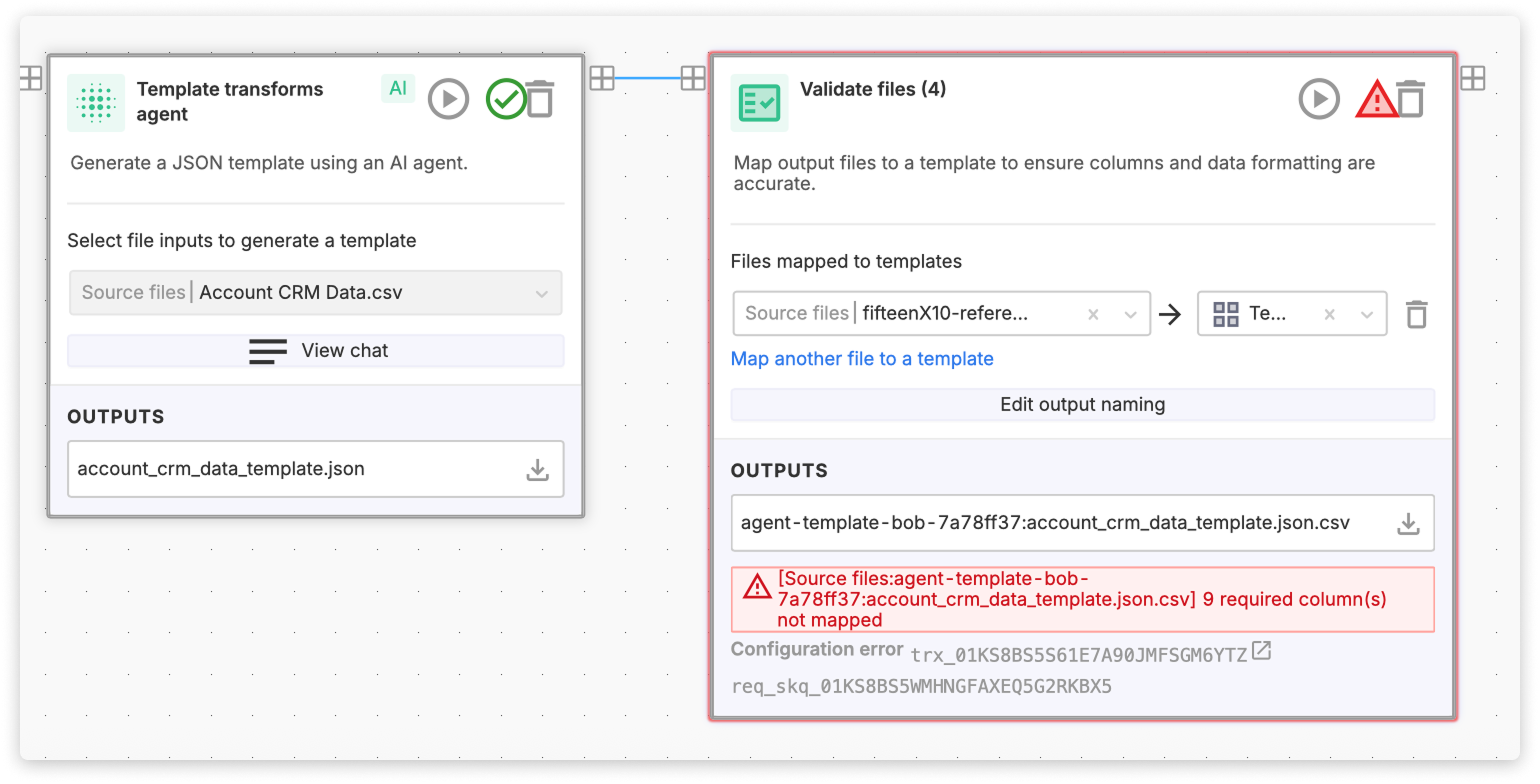
In the MultiFileFeeds builder, add a Template Agent Node and select one or more reference sources — CSV or list inputs that represent the data structure you're working with. Open the chat interface, describe what you want the template to look like, and the node generates and tests the code that will produce it.

The output is a valid OneSchema template in JSON. That template can go two directions: you can save it as a standard reusable template, available across any workflow, or you can reference it directly within the same workflow as a run-scoped template, feeding it into downstream nodes like sheet transforms, CSV transform agents, or validation steps.

Where this changes the template setup calculus

The clearest case is schema-heavy migrations where column counts are high and client-to-client variation is real but structured. Rather than mapping each column by hand, you describe the rules once:

"Require all fields present in both sample files. Capitalize all field names. All fields are nullable except ID and any column named created_at. Use the most restrictive data type that covers at least 90% of the sample data. Numeric value fields should have double-digit precision. Generate picklists for columns with names like 'Status.' Where both sample files have columns with the same name or names that would normalize to the same name, produce a single column with type derived from the combined data."

The node generates the template code from that instruction. When you bring in a new client on the same source system with slightly different column names, you supply their sample file and re-run. The code applies your rules to their schema and produces a correctly configured template without manual rework.

Dynamic picklist generation

The second significant use case is validation against data that changes over time. Picklists in migration templates are typically static: someone enumerates the valid values at configuration time, and the template validates against that fixed list. That breaks when the underlying reference data changes. New cost centers get added, item type classifications expand, department codes are restructured mid-engagement.

With the Template Agent Node, picklists can be generated dynamically from the sample file on each workflow run. You define the rule once:

"All columns are optional except Item Types, which is required and must be filled out. Item Types should use a picklist generated from the values present in the sample file."

Each run, you supply an updated source file. The node regenerates the template with a fresh picklist reflecting the current valid values. Validation in downstream nodes runs against that updated list, not a snapshot from when the workflow was first configured.

For migration engagements where the client's reference data is actively changing, which covers most active ERP or HCM environments, this removes a recurring maintenance step that would otherwise require someone to manually update picklist definitions each time the underlying data evolves.

{{blog-content-cta}}

Template configuration is one of the more persistent friction points in high-volume data migration work. The logic itself isn't complicated. Define the columns, set data types, mark required fields, configure picklists. But, doing it by hand across hundreds of columns, multiplied across clients whose source systems share a schema in name but vary meaningfully in practice, accumulates into a significant time cost. An Oracle ERP implementation at one client produces an export with 340 columns. A different client on the same Oracle version, with two years of customization layered on top, produces 340 columns with different names, different capitalizations, and a different set of status values in the fields that drive picklist validation.

The Template Agent Node addresses this directly. It uses an LLM during the configuration phase to generate the code that produces a template, based on sample data you provide and instructions you give in a conversation. Once that code is generated, running the node executes it deterministically — the LLM is not involved at runtime, so output is stable and repeatable across runs.

How it works

In the MultiFileFeeds builder, add a Template Agent Node and select one or more reference sources — CSV or list inputs that represent the data structure you're working with. Open the chat interface, describe what you want the template to look like, and the node generates and tests the code that will produce it.

The output is a valid OneSchema template in JSON. That template can go two directions: you can save it as a standard reusable template, available across any workflow, or you can reference it directly within the same workflow as a run-scoped template, feeding it into downstream nodes like sheet transforms, CSV transform agents, or validation steps.

Where this changes the template setup calculus

The clearest case is schema-heavy migrations where column counts are high and client-to-client variation is real but structured. Rather than mapping each column by hand, you describe the rules once:

"Require all fields present in both sample files. Capitalize all field names. All fields are nullable except ID and any column named created_at. Use the most restrictive data type that covers at least 90% of the sample data. Numeric value fields should have double-digit precision. Generate picklists for columns with names like 'Status.' Where both sample files have columns with the same name or names that would normalize to the same name, produce a single column with type derived from the combined data."

The node generates the template code from that instruction. When you bring in a new client on the same source system with slightly different column names, you supply their sample file and re-run. The code applies your rules to their schema and produces a correctly configured template without manual rework.

Dynamic picklist generation

The second significant use case is validation against data that changes over time. Picklists in migration templates are typically static: someone enumerates the valid values at configuration time, and the template validates against that fixed list. That breaks when the underlying reference data changes. New cost centers get added, item type classifications expand, department codes are restructured mid-engagement.

With the Template Agent Node, picklists can be generated dynamically from the sample file on each workflow run. You define the rule once:

"All columns are optional except Item Types, which is required and must be filled out. Item Types should use a picklist generated from the values present in the sample file."

Each run, you supply an updated source file. The node regenerates the template with a fresh picklist reflecting the current valid values. Validation in downstream nodes runs against that updated list, not a snapshot from when the workflow was first configured.

For migration engagements where the client's reference data is actively changing, which covers most active ERP or HCM environments, this removes a recurring maintenance step that would otherwise require someone to manually update picklist definitions each time the underlying data evolves.

{{blog-content-cta}}